
Files: Projector.shader
Path: “CGF/Shaders/Unlit/VFX”
Shader menu: “CG Framework/Unlit/VFX/Projector”
Asset Store
Description
Projector shader for Projector component. With more features than the Projector built-in shader in Standard assets package.
🎯 FEATURES
- Projects a material onto objects that intersects.
- Projection component. Uses the Projector built-in component of Unity. Useful to light up surfaces or create dynamic decals.
- Blend capabilities. Supports 12 predefined blend types and custom blend operations. Lights, shadows and other projections.
- Backface culling feature. Applies the projection only on the front of the mesh.
- Multiple projection modes feature. Projects a single or tiled projection.
- UV manipulation feature. Applies a flip or a scrolling effect to UV.
- User friendly. Custom material editor, more usable than the standard.
- Easy configuration. Copy and paste property system.
- Behavior script. Optionally you can use a included C# behavior script to set the material.
🔮 COMPATIBILITY
- Supports Built-in Fog.Tool that allows change the settings of a all colliders from a GameObject or prefab.
- Post processing support. Compatible with Post Processing Stack (all versions) and Legacy Image Effects.
- Absolute Unity compatibility. Works on Unity 5.6 and higher versions.
- Full graphic compatibility. Works with Shader target model 3.0 (DirectX 9, OpenGL 3.0, OpenGL ES 2.0) and higher versions.
- Compatible with Forward rendering.
- Supports Built-in Render Pipeline.
- All platform support. Mobile, virtual reality devices, desktop and console.
- Professional optimization. Optimized for all platforms.
- GPU instancing. Huge call draw saving.
- VR ready. Multi pass rendering, Single pass stereo rendering and Single pass instanced rendering.
Reference
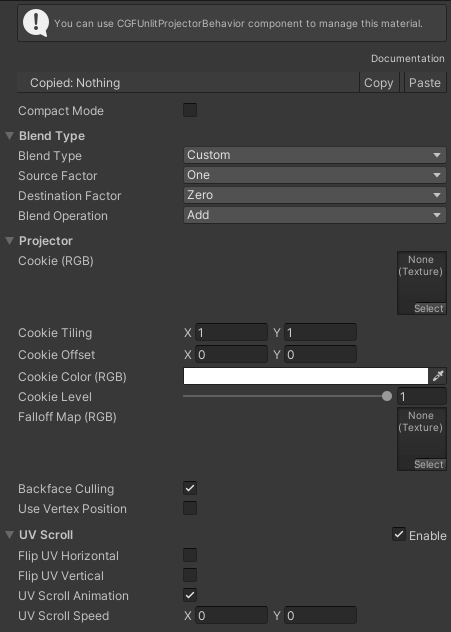
- Blend Type – Manages the blending type.
- Projector
- Cookie – Projection texture. Only uses the RGB channels.
- Cookie Tilling – Scale of the UV of the texture of the projection.
- Cookie Offset – Offset of the UV of the texture of the projection.
- Cookie Color – Color of the projection. Only uses the RGB channels.
- Cookie Level – Projection level intensity.
- Falloff Map – Texture that determines the fading of the projection along its trajectory, it is a linear gradient texture. Only uses the RGB channels.
- Backface Culling – If enabled cull the projection on the backfaces of the mesh.
- Use vertex position – “If enabled use the vertex position instead the vertex normal to cull the backfaces of the mesh.
- UV Scroll – Scroll and Flip the UVs from a texture.
Use
Create a material with this shader and assign the material to the Material property of Projector component.