

Files: CGFObjectPoolingManager.cs, CGFObjectPoolingItemClass.cs
Path: “CGF/Systems/ObjectTransform”
Asset Store
Description
Tool that allows change the settings of a all colliders from a GameObject or prefab.
Reference
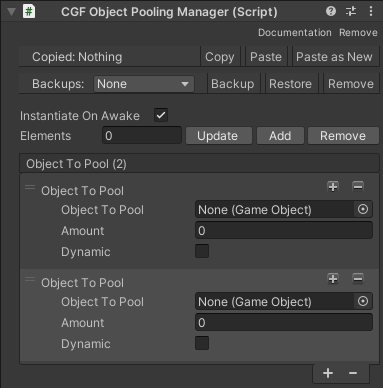
- Instantiate On Awake – Instance all objects on Awake.
- Use Global Parent – Instance all poolable objects inside a parent object.
- Object To Pool – Pooleable objects list.
- Use Parent – Instance all objects of this type inside a parent object.
- Object To Pool – Pooleable object.
- Amount – Total amount of instances.
- Dynamic – Allows to exceed the total amount of instances if needed.
Use
Add the CGFObjectPoolingManager to an empty gameobject in the scene and add all objects to pool to the poolable object list and configure their settings.
Call the method InstantiatePoolObject to instance a poolable object from the poolable object list.
CGFObjectPoolingManager.Instance.InstantiatePoolObject(elementToSpawn.prefab, spawnPosition, Quaternion.identity) as GameObject;In case the object must be destroyed, it must be disabled to return to the pool.
CGFObjectPoolingManager.Instance.DeSpawn(gameObject);Call the method AddObject to add more objects to the pool in run time.
AddObject(GameObject objectToAdd, int amount, bool dynamic)