
Path: “Window/Extensions/CG PsT – Git Manager”
Description
Panel that allows pull, commit and push changes of a git repository.
Limitations
Does not support paths or file names with special characters like “ç” or letters with accents like «á».
Reference
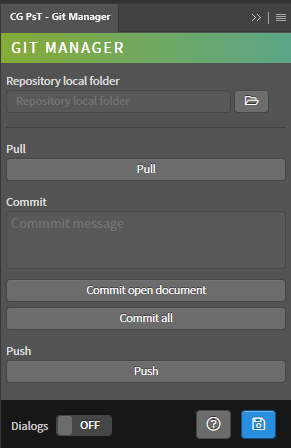
- Repository local folder – Path of the repository folder. It is ht efolder with inside the hidden folder called “.git”. It can be edited from the input field or using the folder selection window.
- Pull – Pull related actions.
- Pull – Pull changes from remote repository.
- Commit – Commit related actions.
- Commit message – Text message for the commit.
- Commit open document – Commit changes on the current open document.
- Commit all – Commit changes on all the files of given respository.
- Push – Push related actions.
- Push – Push changes to remote repository.
- Dialogs – Show dialog messages with useful information during the execution of the panel.
- Help – Open the CG Ps Tools online manual.
- Save – Save the active document.
Use
Open a document, then set the path of the local folder of the repository and use the buttons to run the desired action. Obviously, the document must be inside the repository folder.