Menu: “Window/Extensions/CG PsT – Utilities»
Description
Panel that allows do multiple actions applied to layers and documents.
Reference
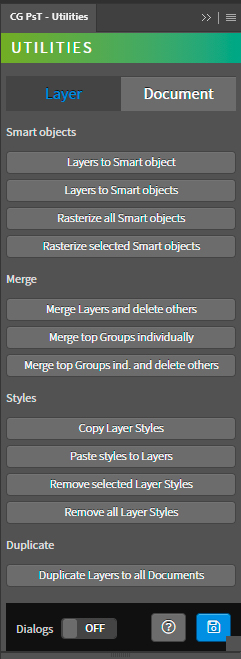
- Layer tab – Tools for layers.
- Smart objects – Tools for smart objects.
- Layers to Smart object – Prefix of the spritesheet name.
- Layers to Smart objects – Name of the spritesheet file. It is automatically updated with the name of the active document.
- Rasterize all Smart objects – Suffix of the spritesheet nombre.
- Rasterize selected Smart objects – Shows the final name of the spritesheet.
- Merge – Tools for merge layers.
- Merge Layers and delete others – Method to obtain sprites from the layers in the root of the document.
- Merge top Groups individually – Method to obtain sprites from the animation frames of the document.
- Merge top Groups individually and delete others – Method to obtain sprites from the selected layers.
- Styles – Sprite ordering mode.
- Copy Layer Styles – Sort the sprites in the spritesheet based on the ascending order of the layer list.
- Paste Stles to Layers – Sort the sprites in the spritesheet based on the descending order of the layer list.
- Remove selected Layers Styles – Sort the sprites in the spritesheet based on the ascending order of the layer list.
- Remove all Layer Styles – Sort the sprites in the spritesheet based on the descending order of the layer list.
- Duplicate – Tools for duplicate layers.
- Duplicate Layers to all Documents – Custom layout of sprites, allows you to enter the number of rows in the spritesheet. The number of columns is calculated based on the number of sprites.
- Smart objects – Tools for smart objects.
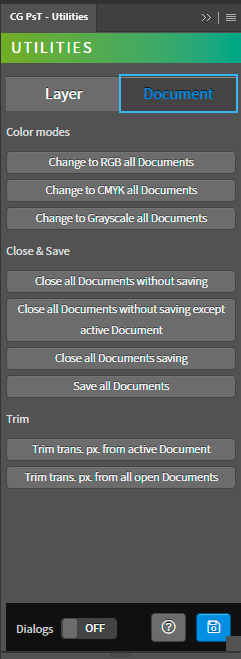
- Document tab – Tools for documents.
- Color modes – Tools for color mode of the document.
- Change to RGB all Documents – Prefix of the spritesheet name.
- Change to CMYK all Documents – Name of the spritesheet file. It is automatically updated with the name of the active document.
- Change to Grayscale all Documents – Suffix of the spritesheet nombre.
- Close – Tools for close of the document.
- Close all Documents without saving – Close all open documents without saving.
- Close all Documetns without saving except active Document – Close all open documents without saving except the active docuemnt.
- Close all Documents saving – Close all open documents saving.
- Save all Documents – Save all open documents.
- Trim – Tools for trim of the document.
- Trim transparent pixels from active Dcoment – Sort the sprites in the spritesheet based on the ascending order of the layer list.
- Trim transparent pixels from all open Dcoments – Sort the sprites in the spritesheet based on the descending order of the layer list.
- Color modes – Tools for color mode of the document.
- Dialogs – Show dialog messages with useful information during the execution of the panel.
- Help – Open the CG Ps Tools online manual.
- Save – Save the active document.
Use
Open a document and use the tools of the panel.