Menu: “Window/Extensions/CG PsT – Layer Property Unifier”
Description
Panel that allows the unification of position, visibility and style properties of the layers in all frames of the document animation.
Reference
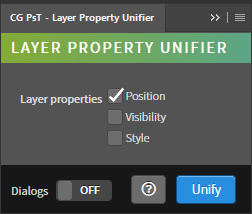
- Layer properties – List of properties of the layers.
- Position – Enable the unification of the position of layers.
- Visibility – Enable the unification of the visibility of layers.
- Style – Enable the unification of the style of layers.
- Dialogs – Show dialog messages with useful information during the execution of the panel.
- Help – Open the CG Ps Tools online manual.
- Unify – Run the main behavior of the panel.
Use
Open a document with an animation, then select the properties to be unified and press Unify.
It is necessary that the number of frames match the number of layers as it unifies the styles of each layer per existing frame in the animation.