
Menu: “Window/Extensions/CG PsT – Layers to Files Exporter”
Description
Panel that allows export the layers or groups of the document as individual files.
Reference
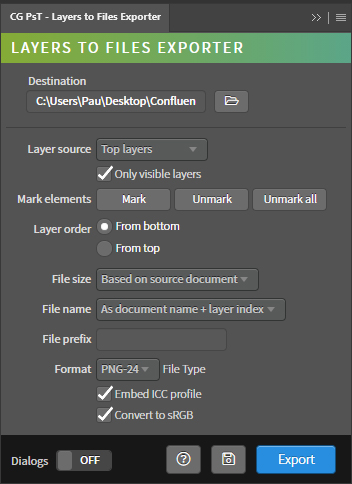
- Destination – Path of the destination folder of the exported file. It is automatically updated with the path of the active document. It can be edited from the input field or using the folder selection window.
- Layer source – Method to obtain the layers. All modes take layer groups into account.
- Top layers – Method to obtain files from the layers and groups in the root of the document.
- All art layers – Method to obtain files from all art layers in the document.
- Selected layers – Method to obtain files from the selected layers.
- Layers with mark – Method to obtain files from the marked layers and groups.
- Guides – Method to obtain files from guides from slices.
- Only visible layers – Determines if the hidden layers of the document are used.
- Mark elements – Layer and group markup and unmark actions.
- Mark – Marks selected layers.
- Unmark – Unmark the selected layers.
- Unmark all – Unmark all marked layers in the document.
- Layer order – Layer ordering mode.
- From bottom – Sort the layers based on the ascending order of the layer list.
- From top – Sort the layers based on the descending order of the layer list.
- File size – List of methods to set the size of the exported file.
- Based on source document – Sets the size of the exported file to the same size as the source document.
- Trim transparent pixels – Sets the size of the exported file after trimming the transparent pixels around each layer, taking into account the size of all layers at once.
- Crop to layer – Sets the size of the exported file after crop the canvas to size of each layer.
- File name – Generation mode of the name of the exported files.
- As document name + index layer – Generation of the name of the exported files from the name of the source document and the index of the exported layer.
- As layer name – Generation of the name of the exported files from the name of the exported layer. If the name of the layer contains spaces, they will be replaced by hyphens.
- As layer index – Generation of the name of the exported files from the index the exported layer.
- As document name + layer name – Generation of the name of the exported files from the name of the source document and the name of the exported layer.
- File prefix – Add a prefix to the exported file.
- Format – List of saving formats of the exported file.
- PNG-24 – Saves the file in PNG-24 format. Preserves the transparent background of the document.
- JPEG – Saves the file in JPEG format. Set the background of the file to white if it is transparent.
- PDF – Saves the file in PDF format. Uses ZIP compression.
- Embed ICC profile – Save the color profile to the file.
- Convert to sRGB – Convert the color space of the fileto sRGB.
- Metadata – Saves the metadata generated by Photoshop.
- File scale – Rescales the document.
- Resaple Method Nearest Neightbor – Uses that resample method when rescale the document.
- Dialogs – Show dialog messages with useful information during the execution of the panel.
- Help – Open the CG Ps Tools online manual.
- Save – Save the active document.
- Export – Run the main behavior of the panel.
Use
Open a document, then set the export properties and press Export.
You can specify a exporting subfolder for a specific layer putting the label “¡nameofthesubfolder!” before the name of the layer. Make sure that the importing mark “¡–!” is at the beginning of the layer name before the subfolder label.