
Description
Unity manages list information as arrays which is uncomfortable for user. To improve usability, lists have been created that allows sort list elements just dragging them and additional features have been added.
Reference
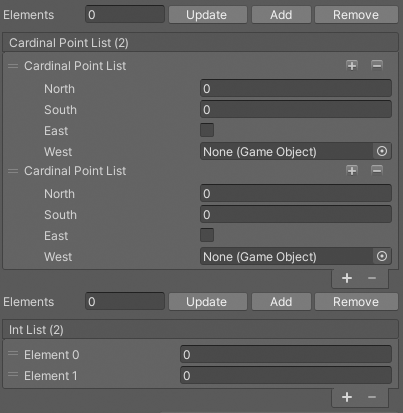
Use
The method “BuildListCustom()” allows you to create reorderable lists of classes. With the “params string[] properties” parameter, assign all the class properties for each list element.
[CustomEditor(typeof(SampleScript))]
[CanEditMultipleObjects]
public class SampleScriptEditor : UnityEditor.Editor
{
    private SerializedProperty _listProperty;
    private ReorderableList _reorderableList;
    private int _newListSize;
    void OnEnable()
    {
         _listProperty = serializedObject.FindProperty("list");
         _reorderableList = new ReorderableList(serializedObject, _listProperty, true, true, true, true);
    }
    public override void OnInspectorGUI()
    {
        serializedObject.Update();
        _newListSize = CGFEditorUtilities.BuildListButtons(_listProperty, _newListSize);
        _reorderableList = CGFEditorUtilities.BuildListCustom(_listProperty, _reorderableList, "List Name", bool vertical, int[] propertySpace, params string[] properties);
        serializedObject.ApplyModifiedProperties();
    }
}
To make easier the add and remove elements actions from the list you have two buttons. The “BuildListButtons()” method adds these buttons.
An additional button has been created that replaces the total number of elements in the list with a new total. This action is activated by matching the int value of the new quantity of elements to the “BuildListButtons()” method.