
Description
Show the settigns of the SubShader.
Reference
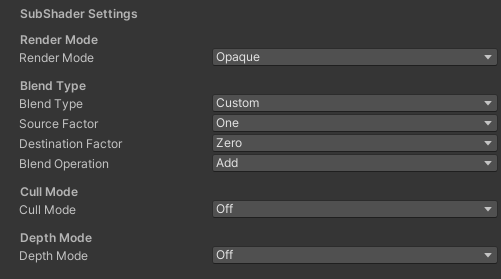
- Render Mode – Manage the render mode.
- Opaque – Set the “RenderType” tag to “Opaque”. Set the source blend mode to “One”. Set the destination blend mode to “Zero”. Set the depth mode to “On”. Set the cull mode to “Back”. Disable the keyword “_ALPHATEST_ON”. Set the “RenderQueue” tag to “Geometry”.
- Transparent – Set the “RenderType” tag to “Transparent”. Set the source blend mode to “SrcAlpha”. Set the destination blend mode to “OneMinuSrcAlpha”. Set the depth mode to “Off”. Set the cull mode to “Back”. Disable the keyword “_ALPHATEST_ON”. Set the “RenderQueue” tag to “Transparent”.
- Cutout – Set the “RenderType” tag to “TransparentCutout”. Set the source blend mode to “One”. Set the destination blend mode to “Zero”. Set the depth mode to “Off”. Set the cull mode to “Off”. Enable the keyword “_ALPHATEST_ON”. Set the “RenderQueue” tag to “AlphaTest”.
- Background – Set the “RenderType” tag to “Opaque”. Set the source blend mode to “One”. Set the destination blend mode to “Zero”. Set the depth mode to “Off”. Set the cull mode to “Back”. Disable the keyword “_ALPHATEST_ON”. Set the “RenderQueue” tag to “Background”.
- Blend Type – Manages the blending type.
- Custom
- Alpha Blend
- Premultiplied
- Additive / Linear Dodge
- Soft Additive
- Multiplicative
- Double Multiplicative
- Particle Blend
- Darken
- Lighten
- Screen
- Linear Burn
- Source Factor – Manages the blending factor from source. Source refers to the calculated color, Destination is the color already on the screen.
- Zero – Blend factor is (0, 0, 0, 0).
- One – Blend factor is (1, 1, 1, 1).
- Dst Color – Blend factor is (Red destination, Green destination, Blue destination, Alpha destination).
- Src Color – Blend factor is (Red source, Green source, Blue source, Alpha source).
- One Minus Dst Color – Blend factor is (1 – Red destination, 1 – Green destination, 1 – Blue destination, 1 – Alpha destination).
- Src Alpha – Blend factor is (Alpha source, Alpha source, Alpha source, Alpha source).
- One Minus Src Color – Blend factor is (1 – Red source, 1 – Green source, 1 – Blue source, 1 – Alpha source).
- Dst Alpha – Blend factor is (Alpha destination, Alpha destination, Alpha destination, Alpha destination).
- One Minus Dst Alpha – Blend factor is (1 – Alpha destination, 1 – Alpha destination, 1 – Alpha destination, 1 – Alpha destination).
- Src Alpha saturate – Blend factor is (f, f, f, 1); where f = min(Alpha source, 1 – Alpha destination).
- One Minus Src Alpha – Blend factor is (1 – Alpha source, 1 – Alpha source, 1 – Alpha source, 1 – Alpha source).
- Destination Factor – Manages the blending factor from destination. Source refers to the calculated color, Destination is the color already on the screen.
- Zero – Blend factor is (0, 0, 0, 0).
- One – Blend factor is (1, 1, 1, 1).
- Dst Color – Blend factor is (Red destination, Green destination, Blue destination, Alpha destination).
- Src Color – Blend factor is (Red source, Green source, Blue source, Alpha source).
- One Minus Dst Color – Blend factor is (1 – Red destination, 1 – Green destination, 1 – Blue destination, 1 – Alpha destination).
- Src Alpha – Blend factor is (Alpha source, Alpha source, Alpha source, Alpha source).
- One Minus Src Color – Blend factor is (1 – Red source, 1 – Green source, 1 – Blue source, 1 – Alpha source).
- Dst Alpha – Blend factor is (Alpha destination, Alpha destination, Alpha destination, Alpha destination).
- One Minus Dst Alpha – Blend factor is (1 – Alpha destination, 1 – Alpha destination, 1 – Alpha destination, 1 – Alpha destination).
- Src Alpha saturate – Blend factor is (f, f, f, 1); where f = min(Alpha source, 1 – Alpha destination).
- One Minus Src Alpha – Blend factor is (1 – Alpha source, 1 – Alpha source, 1 – Alpha source, 1 – Alpha source).
- Blend Operation – Used to combine the pixel shader output with the render target
- Add
- Subtract
- ReverseSubtract
- Min
- Max
- LogicalClear
- LogicalSet
- LogicalCopy
- LogicalCopyInverted
- LogicalNoop
- LogicalInvert
- LogicalAnd
- LogicalNand
- LogicalOr
- LogicalNor
- LogicalXor
- LogicalEquivalence
- LogicalAndReverse
- LogicalAndInverted
- LogicalOrReverse
- LogicalOrInverted
- Multiply
- Screen
- Overlay
- Darken
- Lighten
- ColorDodge
- ColorBurn
- HardLight
- SoftLight
- Difference
- Exclusion
- HSLHue
- HSLSaturation
- HSLColor
- HSLLuminosity
- Cull Mode – Manage the cull mode.
- Depth Mode – Manage the depth mode.