
Description
Show the settigns of the SubShader.
Reference
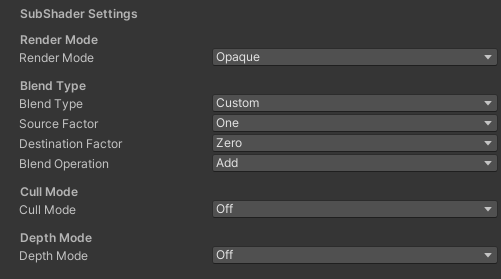
- Render Mode – Manage the render mode.
- Blend Type – Manage the blend type.
- Source Factor – Manage the source blend factor.
- Destination Factor – Manage the destination blend factor.
- Cull Mode – Manage the cull mode.
- Depth Mode – Manage the depth mode.
Use
public class CGFSampleMaterialEditor : CGFMaterialEditorClass
{
    MaterialProperty _RenderMode;
    MaterialProperty _SurfaceRenderMode;
    MaterialProperty _SrcBlend;
    MaterialProperty _DstBlend;
    MaterialProperty _ZWrite;
    MaterialProperty _Cull;
    MaterialProperty _BlendType;
    MaterialProperty _SrcBlendFactor;
    MaterialProperty _DstBlendFactor;

    public override void OnEnable()
    {
        base.OnEnable();
        GetProperties();
    }

    private void GetProperties()
    {
         _RenderMode = FindProperty("_RenderMode");
         _SurfaceRenderMode = FindProperty("_SurfaceRenderMode");
         _SrcBlend = FindProperty("_SrcBlend");
         _DstBlend = FindProperty("_DstBlend");
         _ZWrite = FindProperty("_ZWrite");
         _Cull = FindProperty("_Cull");
         _BlendType = FindProperty("_DstBlend");
         _SrcBlendFactor = FindProperty("_ZWrite");
         _DstBlendFactor = FindProperty("_Cull");
    }

    public override void InspectorGUI()
    {
        CGFMaterialEditorUtilitiesClass.BuildRenderModeEnum(_RenderMode, this);
        CGFMaterialEditorUtilitiesClass.BuildBlendTypeEnum(_BlendType, _SrcBlendFactor, _DstBlendFactor, this);
        CGFMaterialEditorUtilitiesClass.BuildCullModeEnum(_Cull, this);
        CGFMaterialEditorUtilitiesClass.BuildDepthModeEnum(_ZWrite, this);
    }
}