

CGFMaterialEditorUtilitiesClass.cs, CGFMaterialEditorUtilitiesExtendedClass.cs, CGFMaterialEditorClass.cs
Path: «CGF/Editor»
Asset Store
Description
Set of methods and utilities to build material inspector scripts fast and easily.
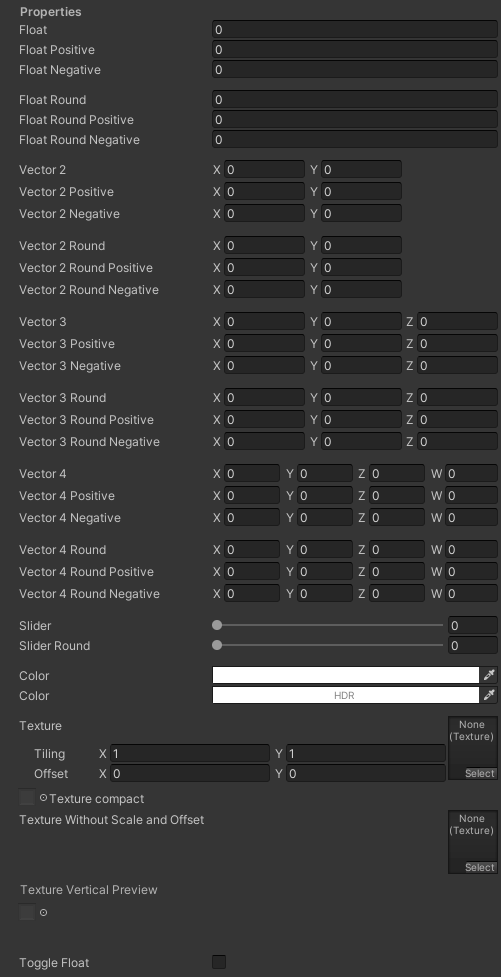
Compatible property types:
- Float
- Generic
- Positive
- Negative
- Rounded
- Rounded Positive
- Rounded Negative
- Slider
- Slider Rounded
- Color
- Texture
- Regular texture
- Mini texture
- Vertical texture
- Toggle float
- Keyword
- Popup (Enums)
- Vector 2, 3 and 4
- Generic
- Positive
- Negative
Use
To create a custom inspector you should create a script with that inherits of “CGFMaterialEditorClass”.
Step 1
Create “MaterialProperty” properties in the editor script.
public class CGFSampleMaterialEditor : CGFMaterialEditorClass
{
    private MaterialProperty _Float;
}
Step 2
Create a method called “GetProperies()”. In this method initialize the “MaterialProperty” properties with the “FindProperty()” method. The paramenter of this method is the name of the property from the shader.
public class CGFSampleMaterialEditor : CGFMaterialEditorClass
{
    private MaterialProperty _Float;

    protected override void GetProperties()
    {
         _Float = FindProperty("_Float");
    }
}
Step 3
The method “OnInspectorGUI()” creates the new inspector, allows draw and place the properties in inspector panel. This method works like the “Update()” method, and it must be overrided to work correctly.
Accessing to the static class “CGFMaterialEditorUtilitiesClass” you can create any field in the inspector calling the building methods in the method “InspectorGUI()”. In this case, the method “BuildFloat()” return a float to create a field in the inspector for the “MaterialProperty” “_Float” variable.
public class CGFSampleMaterialEditor : CGFMaterialEditorClass
{
    private MaterialProperty _Float;

    protected override void GetProperties()
    {
         _Float = FindProperty("_Float");
    }

    protected override void InspectorGUI()
    {
         CGFMaterialEditorUtilitiesClass.BuildFloat("Float", "Float.", _Float);
    }
}
Step 4
Lastly set the CustomEditor setting in the shader with the custom editor script.
.
            .
            }
            ENDCG
        }
    }
    Fallback "Diffuse"
    CustomEditor "CGFSampleMaterialEditor"
}