
Files: CGFRotatoryObjectBehavior.cs
Path: "CGF/Systems/ObjectTransform"
Description
Behavior that allows the associated GameObject to rotate.
Reference
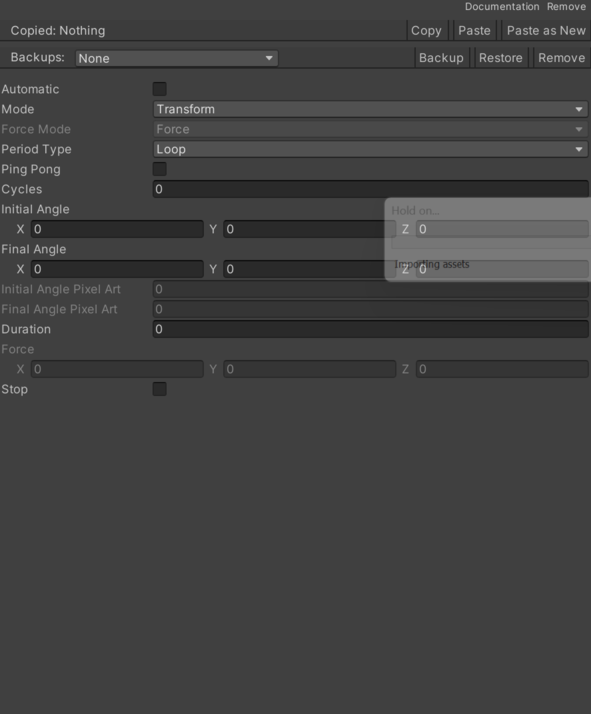
- Automatic – Enables or disables automatic behavior startup.
- Cycles – Number of cycles to perform in the Cycle period type of the PeriodType enumeration.
- Duration – Duration in seconds for the timed operation.
- Final Angle – End angle of the rotation.
- Final Angle Pixel – End angle of the sprite rotation.
- Force – Force value for the rigidbody.
- Force Mode – Force application modes in the selected rigidbody.
- Force – Applies a continuous force using the rigidbody mass.
- Impulse – Applies an instant force using the rigidbody mass.
- Initial Angle – Start angle of the rotation.
- Initial Angle Pixel – Start angle of the sprite rotation.
- Mode – Modes for how the selected GameObject rotates.
- Distance – Copy creation according to the distance between the original GameObject or the last copy and the copy to create.
- Time – Creation of copies according to the elapsed time between the appearance of the original GameObject or the last copy and the copy to create.
- Period Type – Selected rotation mode.
- Loop – Loop mode, when the rotation ends another starts in the same direction indefinitely.
- Cycle – Cycle mode, performs as many rotations as cycles.
- Ping Pong – Enables or disables the Ping Pong effect. When reaching the end of the animation, it repeats in reverse.
- Stop – Enables or disables the force applied to the GameObject.
Use
Add this component to the GameObject that should own the behavior.
Configure the inspector fields listed in Reference and assign the required scene or asset references before entering Play Mode.