
Files: StencilMask.shader
Path: "CGF/Shaders/Others"
Shader menu: "CG Framework/Other/Stencil Mask"
Description
Unity shader CG Framework/Other/Stencil Mask.
Reference
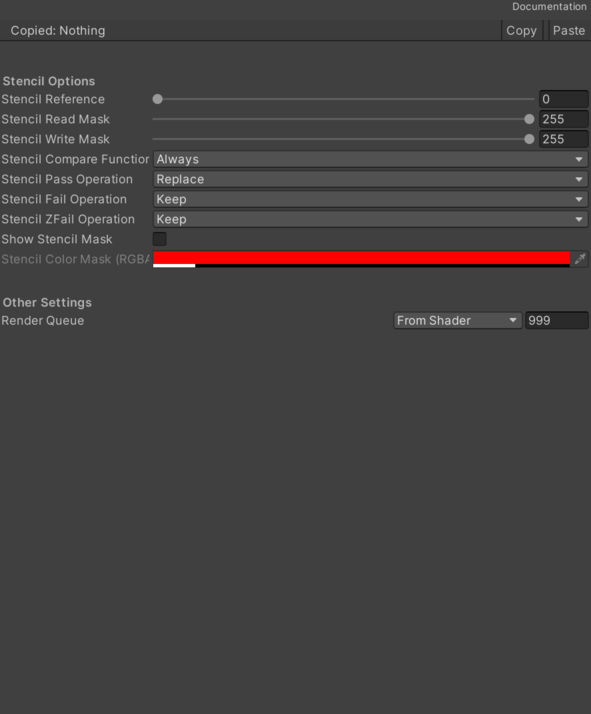
- Stencil Reference – The value to be compared against (if Comp is anything else than always) and/or the value to be written to the buffer (if either Pass, Fail or ZFail is set to replace). 0–255 integer.
- Stencil Read Mask – An 8 bit mask as an 0–255 integer, used when comparing the reference value with the contents of the buffer (referenceValue & readMask) comparisonFunction (stencilBufferValue & readMask). Default: 255.
- Stencil Write Mask – An 8 bit mask as an 0–255 integer, used when writing to the buffer. Note that, like other write masks, it specifies which bits of stencil buffer will be affected by write (i.e. WriteMask 0 means that no bits are affected and not that 0 will be written). Default: 255.
- Stencil Comparison Function – Stencil Comparison Function.
- Stencil Pass Operation – Stencil Pass Operation.
- Stencil Fail Operation – Stencil Fail Operation.
- Stencil ZFail Operation – Stencil ZFail Operation.
- Show Stencil Mask – Should the mesh of the masking object be drawn with alpha? Set color channel writing mask. Writing ColorMask 0 turns off rendering to all color channels. Default mode is writing to all channels (RGBA), but for some special effects you might want to leave certain channels unmodified, or disable color writes completely.
- Stencil Color Mask (RGBA) – Stencil Color Mask.
Use
Assign the shader from CG Framework/Other/Stencil Mask to a material.
Configure the grouped material properties listed in Reference from the Unity material inspector.