
Files: CGFPostDeathBehavior.cs
Path: "CGF/Systems/Death"
Description
"Responsible for providing and managing the characteristics of the behavior after ""death"", such as disappearance type, action after death, making it immune to hits, and sound playback."
Reference
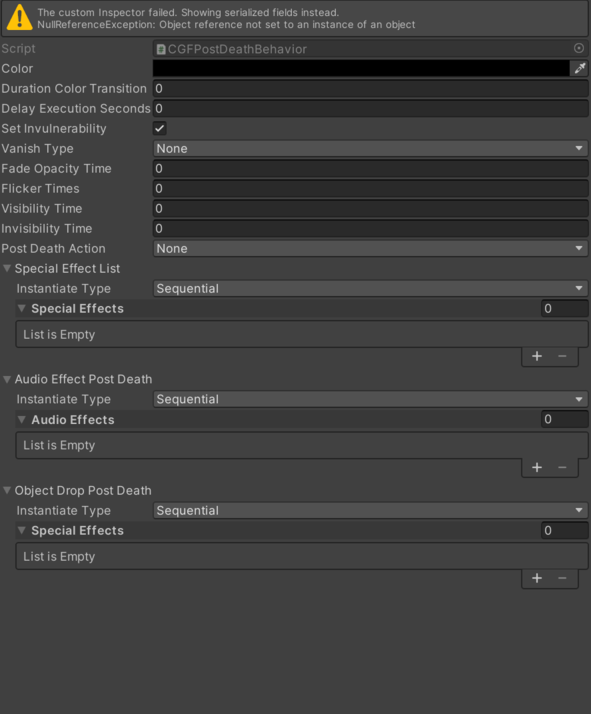
- Audio Effect – Inspector setting used to configure audio Effect Post Death. See Common Features / Audio Effect.
- Color – Color applied to the color.
- Delay Execution Seconds – Time value in seconds used for delay Execution Seconds.
- Duration Color Transition – Time value in seconds used for duration Color Transition.
- Fade Opacity Time – Time value in seconds used for fade Opacity Time.
- Flicker Times – Time value in seconds used for flicker Times.
- Invisibility Time – Time value in seconds used for invisibility Time.
- Object Drop Post Death – Instantiation of the CGFObjectDropBehavior class.
- Instantiate Type – Specifies the instantiation type See Common Features / Instantiate Type.
- Special Effects – List of data objects (ElementsInstantiatorClass) used to determine how elements of type GameObject will be instantiated. See Common Features / Special Effects.
- Post Death Action – Internal value used to configure post Death Action.
- None – Pending documentation.
- Destroy – Pending documentation.
- Disable – Pending documentation.
- Set Invulnerability – Controls whether set Invulnerability is enabled.
- Special Effect List – Instantiation of the CGFVFXInstantiatorClass class. See Common Features / Special Effect List.
- Vanish Type – Internal value used to configure vanish Type.
- None – Pending documentation.
- Instant – Pending documentation.
- Fade Out – Pending documentation.
- Flicker – Pending documentation.
- Visibility Time – Time value in seconds used for visibility Time.
Use
Add this component to the GameObject that should own the behavior.
Configure the inspector fields listed in Reference and assign the required scene or asset references before entering Play Mode.