
Files: CGFResolutionTesterTool.cs
Path: "CGF/Editor/Tools/ResolutionTester"
Menu: "CGF/Optimization and Analysis/Resolution Tester"
Description
Tool that tests Game view screenshots across configured resolutions.
Reference
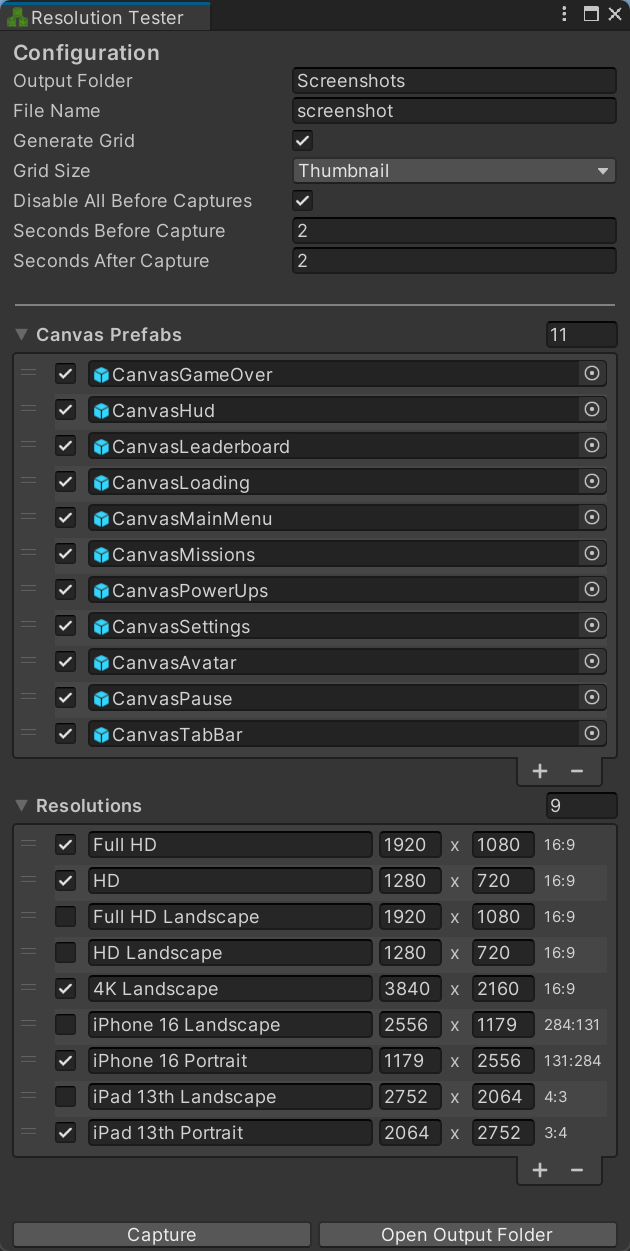
- Configuration
- Output Folder – Folder where screenshots produced by the resolution test are saved.
- File Name – Base name used for captured screenshots; resolution and canvas identifiers are appended automatically.
- Generate Grid – Overlay a reference grid on captured canvases to make alignment and scaling differences easier to compare.
- Grid Size – Spacing in pixels between lines in the generated reference grid.
- Disable All Before Captures – Disable every configured canvas prefab before enabling the one used for each screenshot.
- Seconds Before Capture – Time allowed for layout and rendering to settle after changing resolution or canvas, before taking the screenshot.
- Seconds After Capture – Pause after each screenshot before continuing to the next resolution or canvas.
- Canvas Prefabs – UI prefabs instantiated and captured at each enabled test resolution.
- Resolutions – Game View sizes used to test and capture each enabled canvas prefab.
- Capture – Run the configured canvas prefabs through every enabled resolution and save their screenshots.
- Open Output Folder – Open the screenshot destination folder in the operating-system file browser.
Use
Open the tool from CGF/Optimization and Analysis/Resolution Tester in the Unity editor.
Use the controls listed in Reference to configure the window workflow.