
Files: CGFCanvasScrollRectSnapBehavior.cs
Path: "CGF/Systems/UI"
Description
Allows a ScrollRect to adjust the scroll position to the closest element in its Content. This makes scrolling move from element to element.
Reference
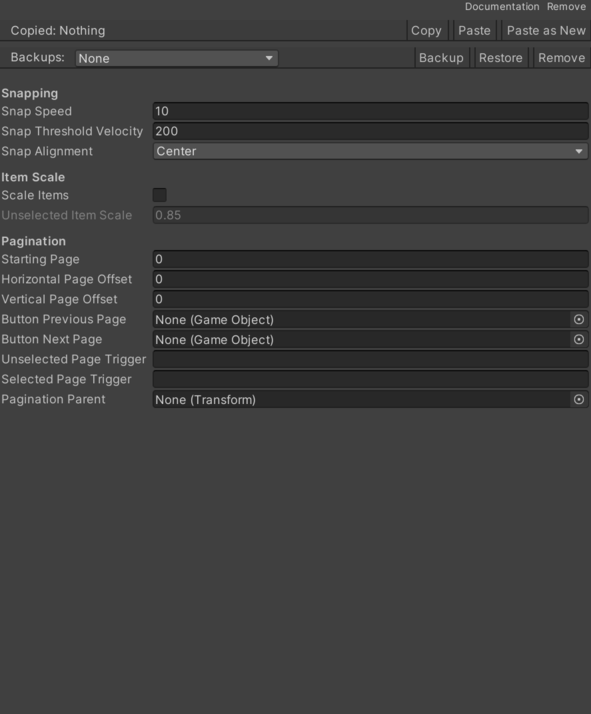
- Button Next Page – Optional button that moves the ScrollRect to the next element.
- Button Previous Page – Optional button that moves the ScrollRect to the previous element.
- Horizontal Page Offset – Additional horizontal offset applied to each page final position.
- Pagination Parent – Container for the visual pagination indicators.
- Scale Items – Enables distance-based scaling for content children.
- Selected Page Trigger – Name of the Animator trigger that plays the selected page state.
- Snap Alignment – Element point that aligns with the viewport when snapping.
- Left – Selects the left option.
- Center – Selects the center option.
- Right – Selects the right option.
- Snap Speed – Speed at which the content interpolates toward the snap position.
- Snap Threshold Velocity – Maximum ScrollRect speed from which automatic snap can start.
- Starting Page – Index of the element to snap to the first time content is available.
- Unselected Item Scale – Scale applied to items far from the selected position.
- Unselected Page Trigger – Name of the Animator trigger that plays the unselected page state.
- Vertical Page Offset – Additional vertical offset applied to each page final position.
Use
Add this component to the GameObject that should own the behavior.
Configure the inspector fields listed in Reference and assign the required scene or asset references before entering Play Mode.