
Files: CGFRuntimeDebuggerSettingsUIManager.cs
Path: "CGF/Systems/RuntimeDebugger/Scripts/Settings"
Description
Manages and synchronizes debug UI elements for various component fields marked with CGFSettingAttribute, spawning them in two separate containers.
Reference
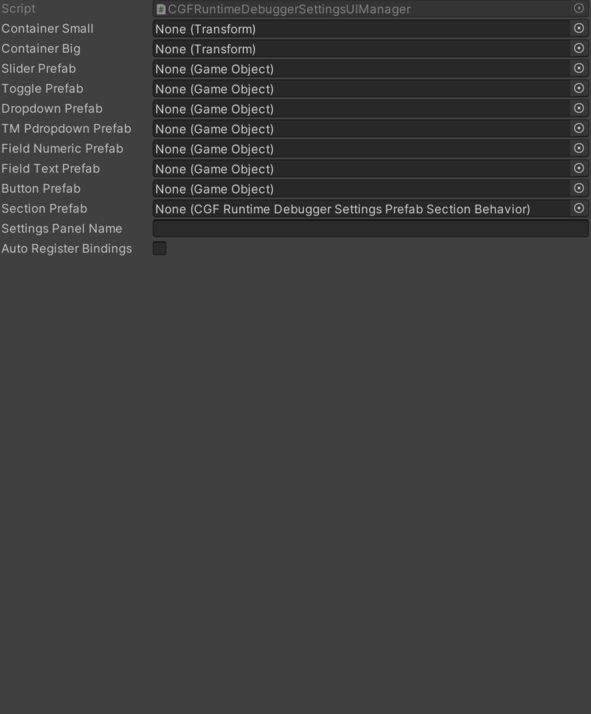
- Auto Register Bindings – Search bind attributes when the panel is enabled?
- Button Prefab – Holds the slider prefab to be instantiated for fields labeled as a button interface.
- Container Big – Points to the second container where spawned debug UI elements are also organized.
- Container Small – Points to the first container where spawned debug UI elements are organized.
- Dropdown Prefab – Holds the slider prefab to be instantiated for fields labeled as a dropdown interface.
- Field Numeric Prefab – Holds the slider prefab to be instantiated for fields labeled as a numeric input interface.
- Field Text Prefab – Holds the slider prefab to be instantiated for fields labeled as a text input interface.
- Section Prefab – Prefab used to group in settings in secitons.
- Settings Panel Name – Name of the settings panel to listen when it's opened;.
- Slider Prefab – Holds the slider prefab to be instantiated for fields labeled as a slider interface.
- T M Pdropdown Prefab – Holds the slider prefab to be instantiated for fields labeled as a dropdown interface.
- Toggle Prefab – Holds the slider prefab to be instantiated for fields labeled as a toggle interface.
Use
Add this component to the GameObject that should own the behavior.
Configure the inspector fields listed in Reference and assign the required scene or asset references before entering Play Mode.