
Files: GradientMap.shader
Path: "CGF/Shaders/Unlit/VFX"
Shader menu: "CG Framework/Unlit/VFX/Gradient Map"
Description
Unity shader CG Framework/Unlit/VFX/Gradient Map.
Reference
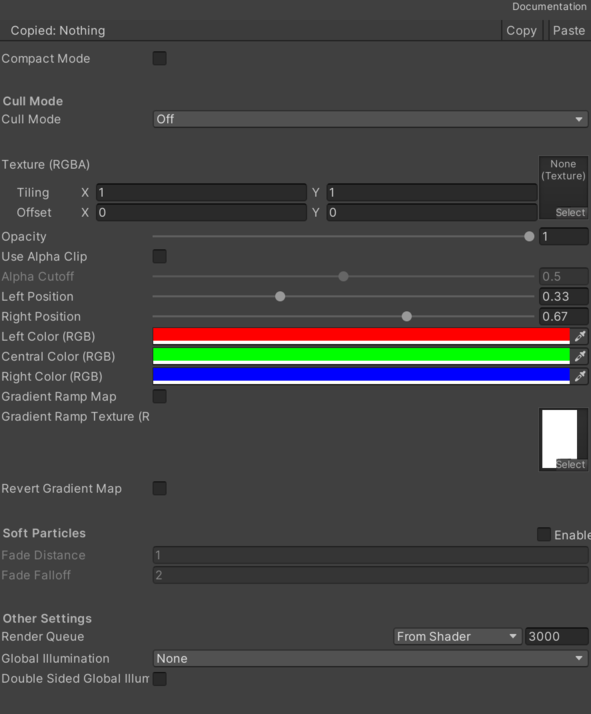
- Texture (RGBA) – Main texture.
- Use Alpha Clip – Enables Alpha Clip.
- Alpha Cutoff – Alpha Cutoff value.
- Color (RGBA) – Color (RGBA).
- Opacity – Opacity level.
- Left Position – Position of the left color of the gradient.
- Right Position – Position of the right color of the gradient.
- Left Color (RGB) – Left color of the gradient.
- Central Color (RGB) – Central color of the gradient.
- Right Color (RGB) – Right color of the gradient.
- Gradient Ramp Map – If enabled use a texture to generate the color gradient.
- Gradient Ramp Texture (RGB) – Gradient ramp texture.
- Revert Gradient Map – If enabled revert the colors in the gradient.
- Soft Particles – Fade out particles when they get close to the surface of objects.
- Fade Distance – Fade length.
- Fade Falloff – Fallof value.
- Cull – Cull.
Use
Assign the shader from CG Framework/Unlit/VFX/Gradient Map to a material.
Configure the grouped material properties listed in Reference from the Unity material inspector.