
Files: Smear.shader
Path: "CGF/Shaders/ImageEffect"
Shader menu: "CG Framework/Image Effect/Smear"
Description
Unity shader CG Framework/Image Effect/Smear.
Reference
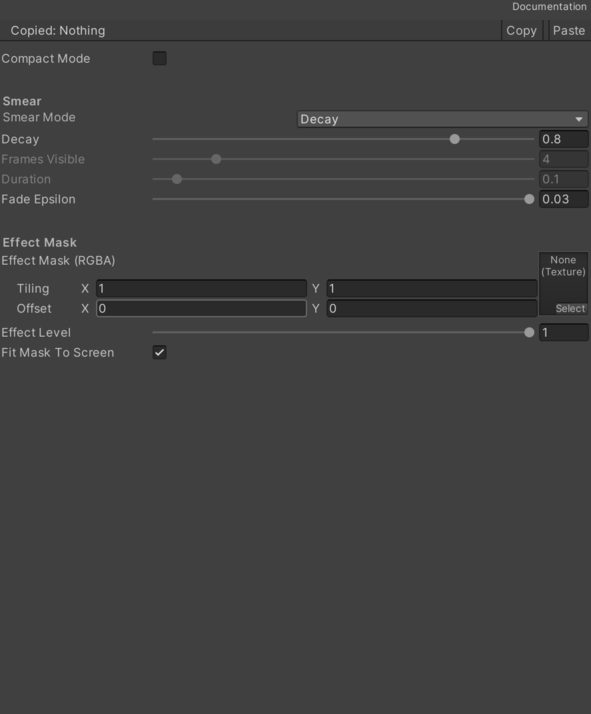
- Current Frame – Current Frame.
- History Frame – History Frame.
- Smear Mode – Relative to a multiplier or absolute to a fixed resolution.
- Decay – Selects the Decay option.
- Frames – Selects the Frames option.
- Time – Selects the Time option.
- Decay – The percentage of the previous frame that is retained in the current frame. 0 = no. decay = 0.5 → you retain 50% of the previous frame, decay = 0.9 → you retain 90% of the previous frame.
- Frames Visible – Number of frames of the smear effect.
- Duration – Smear effect duration in seconds.
- Delta Time – Delta Time.
- Fade Epsilon – Threshold at which the frames of the effect completely fade away.
- Effect Mask (RGBA) – Color of the efect mask.
- Effect Level – Level of effect in relation the source color.
- Fit Mask To Screen – If enabled, fits the mask texture to screen size.
Use
Assign the shader from CG Framework/Image Effect/Smear to a material.
Configure the grouped material properties listed in Reference from the Unity material inspector.