
Files: CGFSpriteTrailBehavior.cs
Path: "CGF/Systems/VisualEffects/Trail"
Description
Behavior that allows the associated GameObject to use sprite Trail.
Reference
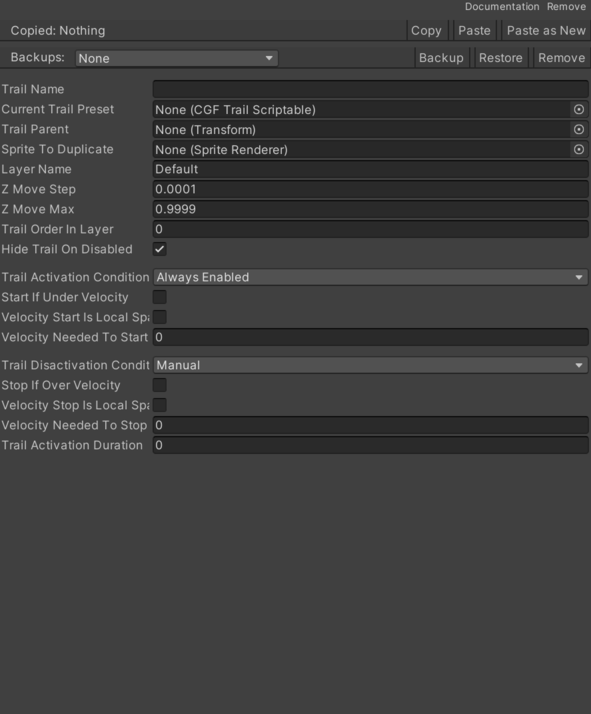
- Current Trail Preset – Internal value used to configure Current Trail Preset.
- Elements In Trail – Internal value containing the Elements In Trail entries used by this component.
- Hide Trail On Disabled – Controls whether Hide Trail On Disabled is enabled.
- Layer – Name used to identify Layer Name. See Common Features / Layer.
- Sprite To Duplicate – Inspector setting used to configure Sprite To Duplicate.
- Start If Under Velocity – Controls whether Start If Under Velocity is enabled.
- Stop If Over Velocity – Controls whether Stop If Over Velocity is enabled.
- Trail Activation Condition – Internal value used to configure Trail Activation Condition.
- Always Enabled – Selects the always enabled option.
- Manual – Requires the option to be controlled manually.
- Velocity Magnitude – Selects the velocity magnitude option.
- Trail Activation Duration – Time value in seconds used for Trail Activation Duration.
- Trail Disactivation Condition – Internal value used to configure Trail Disactivation Condition.
- Manual – Requires the option to be controlled manually.
- Velocity Magnitude – Selects the velocity magnitude option.
- Time – Selects the time option.
- Trail Name – Name used to identify Trail Name.
- Trail Order In Layer – Numeric setting used for Trail Order In Layer.
- Trail Parent – Cached reference to the Trail Parent used at runtime.
- Velocity Needed To Start – Movement rate used for Velocity Needed To Start.
- Velocity Needed To Stop – Movement rate used for Velocity Needed To Stop.
- Velocity Start Is Local Space – Controls whether Velocity Start Is Local Space is enabled.
- Velocity Stop Is Local Space – Controls whether Velocity Stop Is Local Space is enabled.
- Z Move Max – Numeric setting used for Z Move Max.
- Z Move Step – Numeric setting used for Z Move Step.
Use
Add this component to the GameObject that should own the behavior.
Configure the inspector fields listed in Reference and assign the required scene or asset references before entering Play Mode.