
Files: CGFCrashReporterManager.cs
Path: "CGF/Systems/CrashReporter"
Description
Manages collection and persistence of crash reports and Unity logs during runtime.
Reference
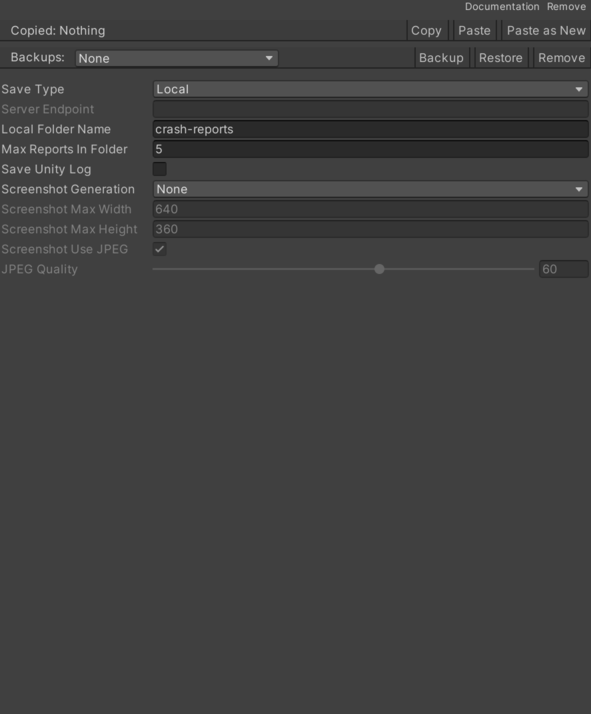
- Local Folder Name – Subfolder name inside Application.persistentDataPath used to store local reports.
- Max Reports In Folder – Maximum number of report files to keep in the local folder (older files are pruned).
- Save Type – Determines where reports will be stored (local, server, or both).
- Server – Send reports to a remote server endpoint only.
- Local – Save reports locally on the device only.
- Both – Save reports both locally and to the remote server.
- Save Unity Log – When enabled, Unity log messages are persisted along with crash data.
- Screenshot Generation – Rule for when screenshots are captured and attached to crash reports.
- None – Do not capture screenshots.
- Managed Exception – Capture screenshots for managed (manually reported) exceptions.
- Not Managed Exception – Capture screenshots for unhandled exceptions detected from Unity logs or AppDomain.
- Both – Capture screenshots for both managed and unhandled exceptions.
- Screenshot Jpeg Quality – JPEG quality used when encoding screenshots (1-100).
- Screenshot Max Height – Maximum height for captured screenshots before encoding (maintains aspect ratio).
- Screenshot Max Width – Maximum width for captured screenshots before encoding (maintains aspect ratio).
- Screenshot Use Jpeg – Whether to encode screenshots as JPEG (true) or PNG (false).
- Server Endpoint – Remote server endpoint to which reports may be sent (unused if not configured).
Use
Add this component to the GameObject that should own the behavior.
Configure the inspector fields listed in Reference and assign the required scene or asset references before entering Play Mode.