
Files: CGFObjectShakerBehavior.cs
Path: "CGF/Systems/VisualEffects"
Description
Behavior that allows the associated GameObject to shake.
Reference
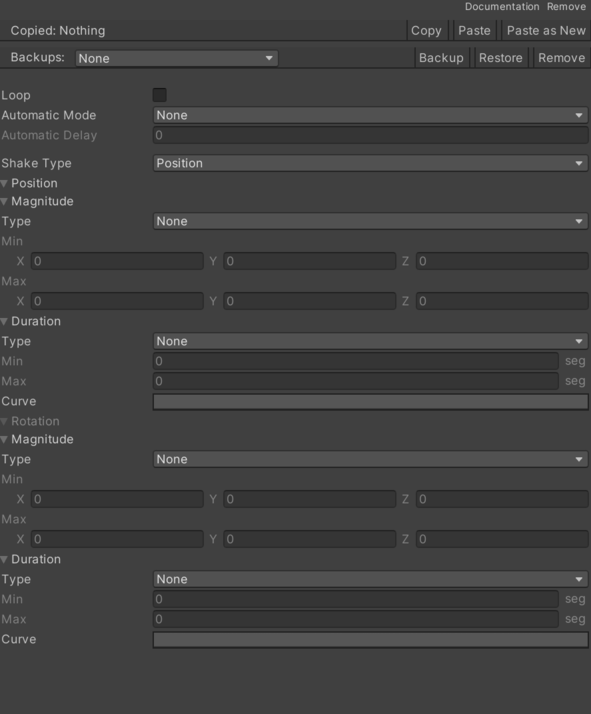
- Automatic Mode – Enables or disables automatic behavior startup. See Common Features / Automatic Mode.
- Loop – Controls whether loop is enabled.
- Mode – Selected shake mode.
- Position – Position shake.
- Rotation – Rotation shake.
- Both – Position and rotation shake.
- Position – Position shake configuration.
- Curve – Position shake behavior curve.
- Duration – Position shake duration interval.
- Max – Internal value used to configure max.
- Min – Internal value used to configure min.
- Type – Internal value used to configure type.
- None – No interval is applied.
- Fixed – Uses a fixed value for the interval.
- Ranged Fixed – Generates a random value within the range once and reuses it.
- Ranged Random – Generates a new random value within the range each time it is accessed.
- Magnitude – Position shake magnitude interval.
- Max – Internal value used to configure max.
- Min – Internal value used to configure min.
- Type – Internal value used to configure type.
- None – No interval is applied.
- Fixed – Uses a fixed value for the interval.
- Ranged Fixed – Generates a random value within the range once and reuses it.
- Ranged Random – Generates a new random value within the range each time it is accessed.
- Rotation – Rotation shake configuration.
- Curve – Rotation shake behavior curve.
- Duration – Rotation shake duration interval.
- Max – Internal value used to configure max.
- Min – Internal value used to configure min.
- Type – Internal value used to configure type.
- None – No interval is applied.
- Fixed – Uses a fixed value for the interval.
- Ranged Fixed – Generates a random value within the range once and reuses it.
- Ranged Random – Generates a new random value within the range each time it is accessed.
- Magnitude – Rotation shake magnitude interval.
- Max – Internal value used to configure max.
- Min – Internal value used to configure min.
- Type – Internal value used to configure type.
- None – No interval is applied.
- Fixed – Uses a fixed value for the interval.
- Ranged Fixed – Generates a random value within the range once and reuses it.
- Ranged Random – Generates a new random value within the range each time it is accessed.
Use
Add this component to the GameObject that should own the behavior.
Configure the inspector fields listed in Reference and assign the required scene or asset references before entering Play Mode.