
Files: CGFRuntimeDebuggerConsoleVirtualVerticalLayoutGroupController.cs
Path: "CGF/Systems/RuntimeDebugger/Scripts/Console"
Description
Controller that allow to controll show vertiacal console log.
Reference
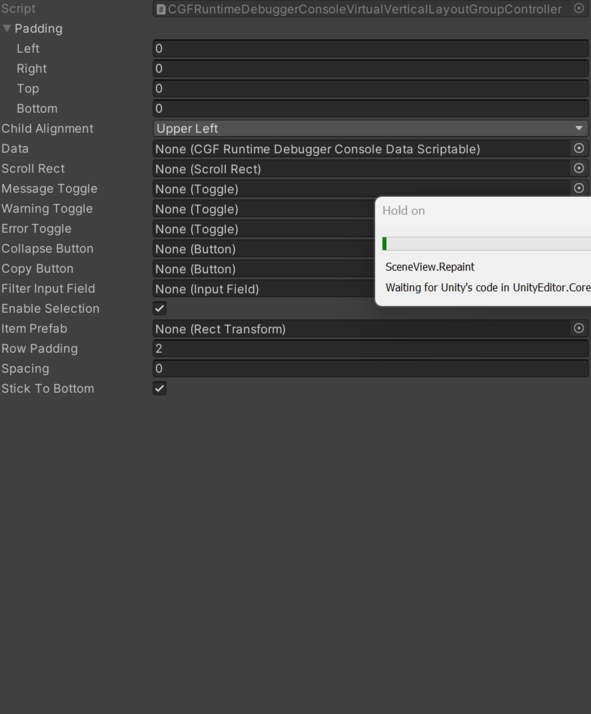
- Collapse Button – Button that toggles between collapsed and expanded log entries.
- Copy Button – Button that copies all logs to the system clipboard.
- Data – Pending documentation.
- Enable Selection – Controls whether enable Selection is enabled.
- Error Toggle – Toggle controlling the visibility of error log messages.
- Filter Input Field – Input field used to filter log messages by text.
- Item Prefab – Reference to the item Prefab used by this component.
- Message Toggle – Toggle controlling the visibility of informational log messages.
- Row Padding – Rows to show above and below the visible rect to reduce pop-in.
- Scroll Rect – Pending documentation.
- Spacing – Spacing to add between rows.
- Stick To Bottom – If true, the scroll view will stick to the last element when fully scrolled to the bottom and an item is added.
- Warning Toggle – Toggle controlling the visibility of warning log messages.
Use
Add this component to the GameObject that should own the behavior.
Configure the inspector fields listed in Reference and assign the required scene or asset references before entering Play Mode.