
Files: CGFCanvasImageBlurBehavior.cs
Path: "CGF/Systems/UI/ImageComponent"
Description
Behavior that allows the associated gameobject apply a blur effect the assigned sprite.
Reference
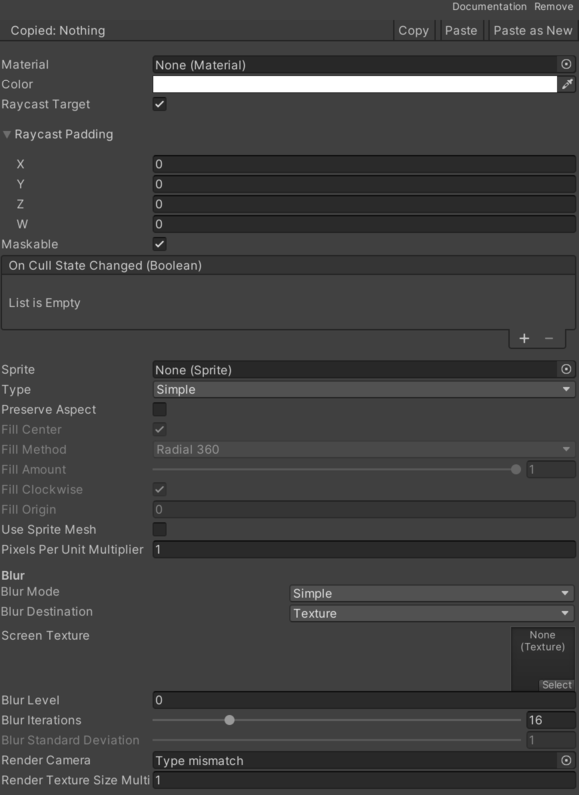
- Blur Destination – Current destination of the blur effect, a texture from the camera or the grab pass texture.
- Texture – Up direction axis.
- Grab Pass – Down direction axis.
- Blur Iterations – Iterations of the blur effect. More iterations implies more GPU usage.
- Blur Level – Level of the blur effect.
- Blur Mode – Current blur effect.
- Simple – Simple blur effect.
- Medium – Medium blur effect.
- Advanced – Advanced blur effect.
- Box – Box blur effect.
- Gaussian – Gaussian blur effect.
- Blur Orientation – Current orientation of the blur, only for Gaussian blur.
- Horizontal – Up direction axis.
- Vertical – Down direction axis.
- Blur Standard Deviation – Standard deviation of the blur, only for Gaussian blur.
- Main Camera – Camera to fill the render texture.
- Render Texture – Multiplier for the size of the render texture based on the main camera dimensions. See Common Features / Render Texture.
- Screen Texture – Render image of the current frame.
Use
Add this component to the GameObject that should own the behavior.
Configure the inspector fields listed in Reference and assign the required scene or asset references before entering Play Mode.