
Files: CGFSimulatedLightManager.cs
Path: "CGF/Systems/Shaders/Managers"
Description
Manager that allows the associated GameObject to modify values of shaders that have the Simulated Light property.
Reference
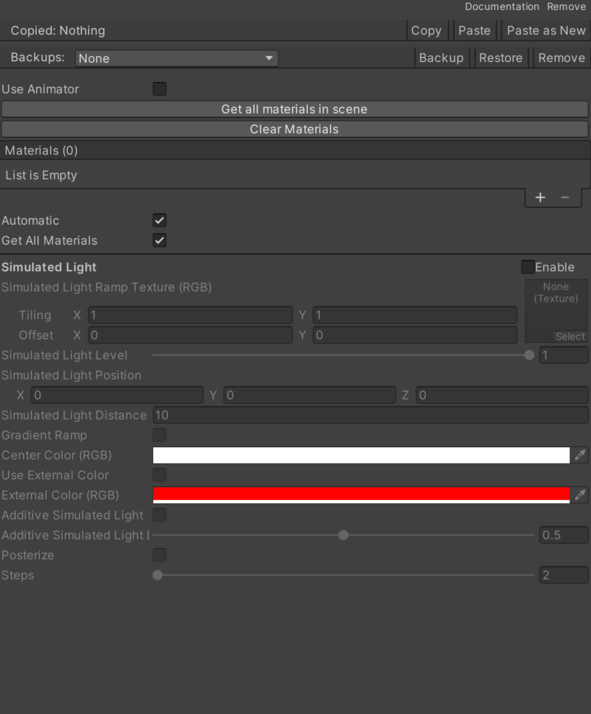
- Additive Simulated Light – Controls whether additive Simulated Light is enabled.
- Additive Simulated Light Level – Numeric setting used for additive Simulated Light Level.
- Center Color – Color applied to the center Color.
- External Color – Color applied to the external Color.
- Gradient Ramp – Controls whether gradient Ramp is enabled.
- Posterize – Controls whether posterize is enabled.
- Simulated Light – Controls whether simulated Light is enabled.
- Simulated Light Distance – Measurement used to configure the simulated Light Distance.
- Simulated Light Level – Numeric setting used for simulated Light Level.
- Simulated Light Position – Inspector setting that defines the simulated Light Position.
- Simulated Light Ramp Texture – Reference to the simulated Light Ramp Texture used by this component.
- Simulated Light Ramp Texture Offset – Inspector setting that defines the simulated Light Ramp Texture Offset.
- Simulated Light Ramp Texture Tiling – Inspector setting that defines the simulated Light Ramp Texture Tiling.
- Steps – Numeric setting used for steps.
- Use External Color – Controls whether this component uses external color.
Use
Add this component to the GameObject that should own the behavior.
Configure the inspector fields listed in Reference and assign the required scene or asset references before entering Play Mode.