
Files: CGFParticleBehavior.cs
Path: "CGF/Systems"
Description
Behavior that allows the associated GameObject to simulate the movement of a particle.
Reference
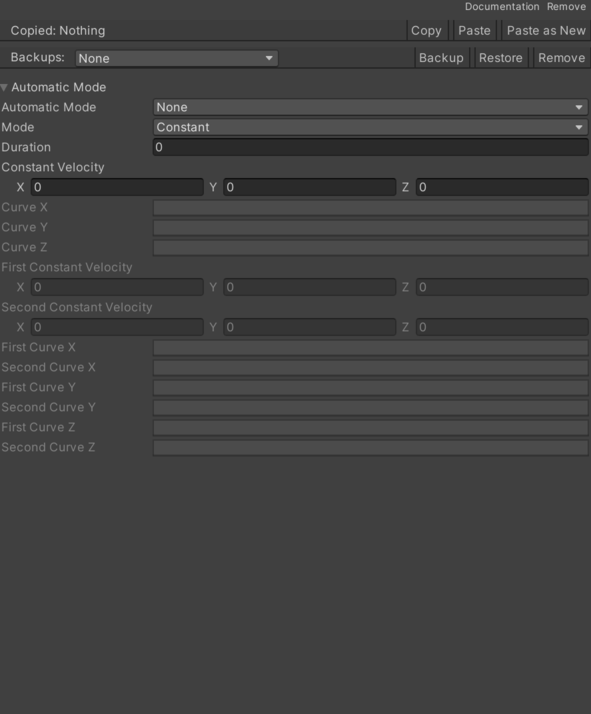
- Automatic Mode – Enables or disables automatic behavior startup. See Common Features / Automatic Mode.
- Constant Velocity – Inspector setting used by this component to configure constant velocity.
- Curve X – Movement velocity from an animation curve on the X axis.
- Curve Y – Movement velocity from an animation curve on the Y axis.
- Curve Z – Movement velocity from an animation curve on the Z axis.
- Duration – Particle lifetime duration.
- First Constant Velocity – Start of the random velocity range on each axis.
- First Curve X – Start animation curve for the random velocity range between two curves on the X axis.
- First Curve Y – Start animation curve for the random velocity range between two curves on the Y axis.
- First Curve Z – Start animation curve for the random velocity range between two curves on the Z axis.
- Mode – Selected particle velocity mode.
- Distance – Copy creation according to the distance between the original GameObject or the last copy and the copy to create.
- Time – Creation of copies according to the elapsed time between the appearance of the original GameObject or the last copy and the copy to create.
- Second Constant Velocity – End of the random speed range on each axis.
- Second Curve X – End animation curve for the random velocity range between two curves on the X axis.
- Second Curve Y – End animation curve for the random velocity range between two curves on the Y axis.
- Second Curve Z – End animation curve for the random velocity range between two curves on the Z axis.
Use
Add this component to the GameObject that should own the behavior.
Configure the inspector fields listed in Reference and assign the required scene or asset references before entering Play Mode.