
Files: CGFCurvedWorldManager.cs
Path: "CGF/Systems/Shaders/Managers"
Description
Manager that allows to the attached Gameobject manager the value sof the shaders with the property World Curver.
Reference
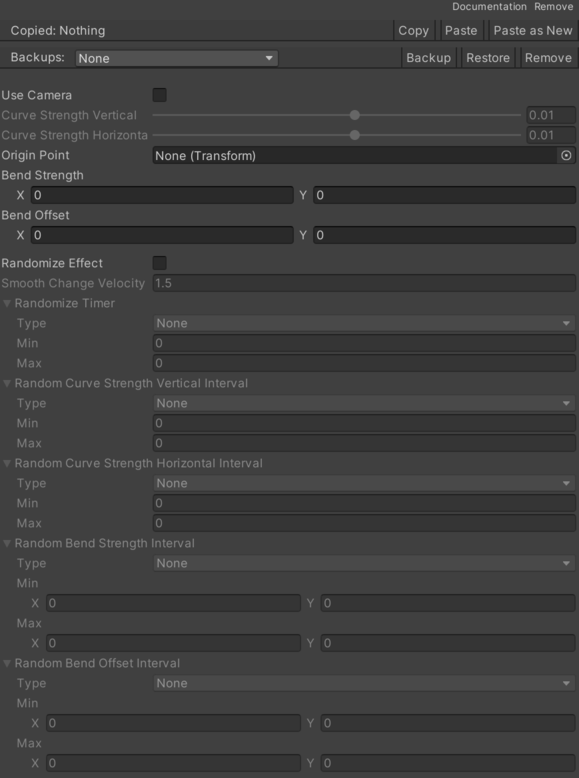
- Bend Offset – Stores the offset values for the bend effect.
- Bend Strength – Stores the strength values for the bend effect.
- Curve Strength Horizontal – Stores the horizontal curvature strength.
- Curve Strength Vertical – Stores the vertical curvature strength.
- Origin Point – Stores the reference point for curvature origin.
- Random Bend Offset Interval – Interval that defines the random offset of the bend effect.
- Max – Internal value used to configure max.
- Min – Internal value used to configure min.
- Type – Internal value used to configure type.
- None – No interval is applied.
- Fixed – Uses a fixed value for the interval.
- Ranged Fixed – Generates a random value within the range once and reuses it.
- Ranged Random – Generates a new random value within the range each time it is accessed.
- Random Bend Strength Interval – Interval that defines the random strength of the bend effect.
- Max – Internal value used to configure max.
- Min – Internal value used to configure min.
- Type – Internal value used to configure type.
- None – No interval is applied.
- Fixed – Uses a fixed value for the interval.
- Ranged Fixed – Generates a random value within the range once and reuses it.
- Ranged Random – Generates a new random value within the range each time it is accessed.
- Random Curve Strength Horizontal Interval – Interval that defines the random strength of the horizontal curve.
- Max – Internal value used to configure max.
- Min – Internal value used to configure min.
- Type – Internal value used to configure type.
- None – No interval is applied.
- Fixed – Uses a fixed value for the interval.
- Ranged Fixed – Generates a random value within the range once and reuses it.
- Ranged Random – Generates a new random value within the range each time it is accessed.
- Random Curve Strength Vertical Interval – Interval that defines the random strength of the vertical curve.
- Max – Internal value used to configure max.
- Min – Internal value used to configure min.
- Type – Internal value used to configure type.
- None – No interval is applied.
- Fixed – Uses a fixed value for the interval.
- Ranged Fixed – Generates a random value within the range once and reuses it.
- Ranged Random – Generates a new random value within the range each time it is accessed.
- Randomize Effect – Determines whether the effect should be randomized.
- Randomize Timer – Interval that defines the time between random changes.
- Max – Internal value used to configure max.
- Min – Internal value used to configure min.
- Type – Internal value used to configure type.
- None – No interval is applied.
- Fixed – Uses a fixed value for the interval.
- Ranged Fixed – Generates a random value within the range once and reuses it.
- Ranged Random – Generates a new random value within the range each time it is accessed.
- Smooth Change Velocity – Controls the velocity of the smooth change effect.
- Use Camera – Stores whether the camera influences the curvature effect.
Use
Add this component to the GameObject that should own the behavior.
Configure the inspector fields listed in Reference and assign the required scene or asset references before entering Play Mode.