
Files: CGFObjectTrailBehavior.cs
Path: "CGF/Systems/VisualEffects"
Description
Behavior that allows the associated GameObject to create a trail of visual copies of itself.
Reference
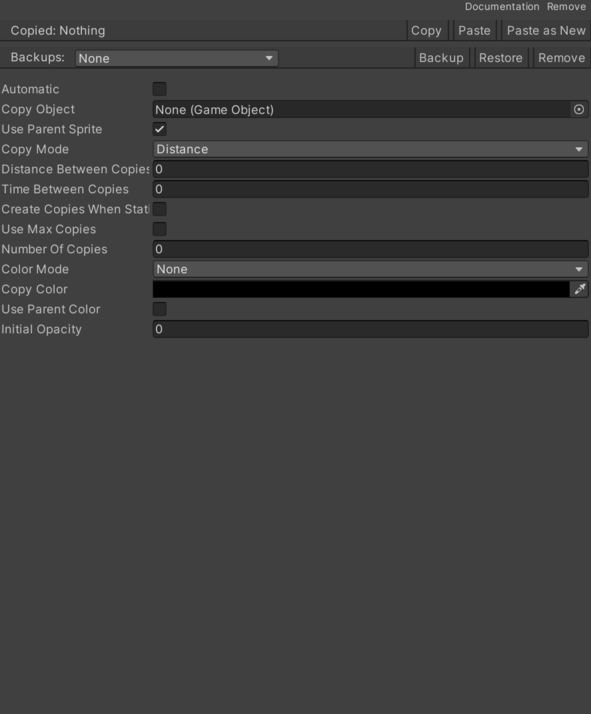
- Automatic – Controls whether automatic is enabled.
- Color Mode – Selected mode for applying a color to the copies.
- None – No color is applied to the copies.
- One Color – A color is applied to all copies.
- Copy Color – Color to apply to the copies when the "OneColor" application mode is selected.
- Copy Mode – Selected mode that defines how the copies that form the trail are created.
- Distance – Copy creation according to the distance between the original GameObject or the last copy and the copy to create.
- Time – Creation of copies according to the elapsed time between the appearance of the original GameObject or the last copy and the copy to create.
- Copy Object – Instances of this GameObject form the trail.
- Create Copies When Static – Enables or disables copy creation when the object is still.
- Distance Between Copies – Maximum distance between copies.
- Initial Opacity – Initial opacity applied to the copies.
- Number Of Copies – Maximum number of copies that form the trail.
- Time Between Copies – Elapsed time between copy creation.
- Timebetween Copies – Tiempo entre copias.
- Use Max Copies – Enables or disables the limit of copies that form the trail.
- Use Parent Color – Changes the copy sprite to the current object sprite.
- Use Parent Sprite – Changes the copy sprite to the current object sprite.
Use
Add this component to the GameObject that should own the behavior.
Configure the inspector fields listed in Reference and assign the required scene or asset references before entering Play Mode.