
Files: CGFSortingLayerManagerTool.cs
Path: "CGF/Editor/Tools"
Menu: "CGF/2D /Sorting Layer Manager"
Description
Tool that allows sort comfortably the sorting layers and order in layer of the elements from de current scene.
Reference
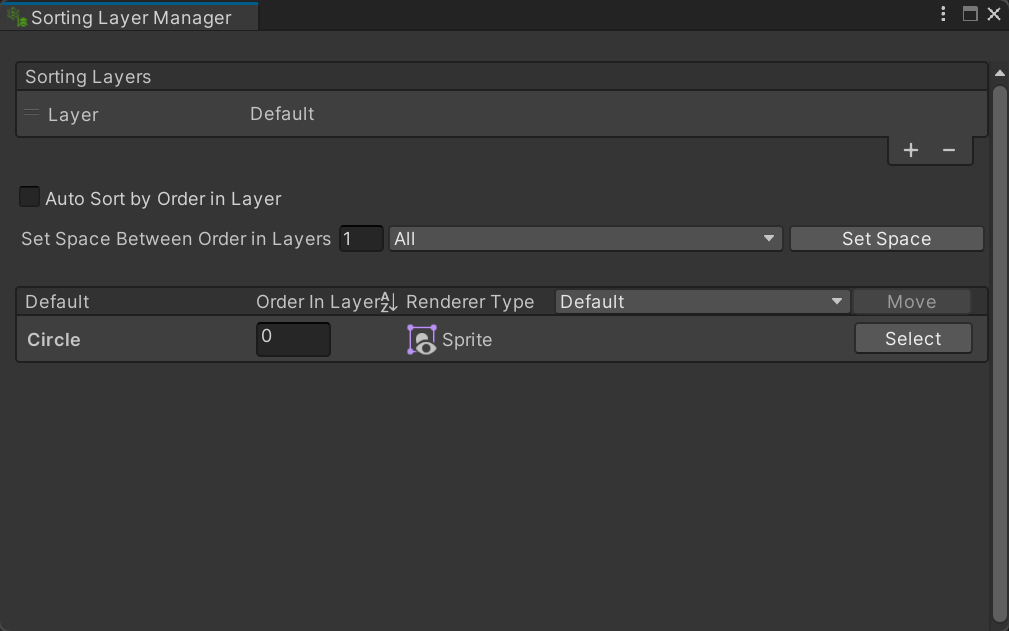
- Auto Sort by Order in Layer – Reorder each layer's renderer list after a Sorting Order field loses focus.
- Set Space Between Order in Layers – Number of unused sorting-order values inserted between consecutive renderers.
- Set Space – Reassign sorting orders in the chosen layer, or all layers, using the requested spacing.
- Order In Layer – Sort renderer rows in this layer by their current Order in Layer values.
- Move – Choose a renderer in this list and a different destination layer before moving it.
- Move – Move the selected renderer from this list to the sorting layer chosen on the left.
- Select – Select and frame this renderer's GameObject in the Unity Editor.
Use
Open the tool from CGF/2D /Sorting Layer Manager in the Unity editor.
Use the controls listed in Reference to configure the window workflow.