
Files: ParticleToon.shader
Path: "CGF/Shaders/Lit/VFX"
Shader menu: "CG Framework/Lit/VFX/Particle Toon"
Description
Unity shader CG Framework/Lit/VFX/Particle Toon.
Reference
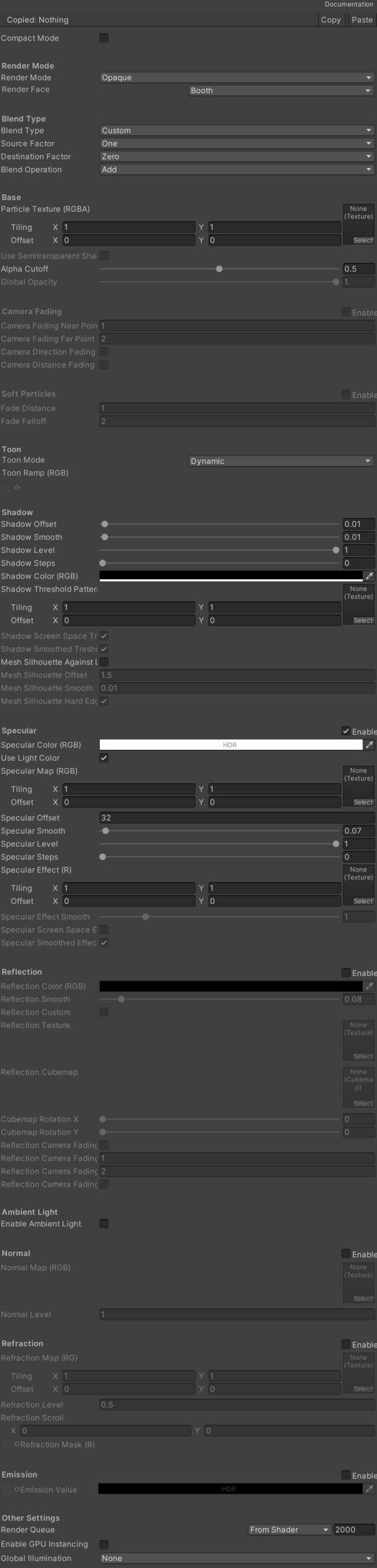
- Particle Texture – Main texture.
- Use Semitransparent Shadows – Enable the semitransparent shadows, apply a dithering to the sahdows based on the opacity of the mesh, only works with transparent render ModeType.
- Alpha Cutoff – Alpha Cutoff value.
- Global Opacity – Manages the opacity of the mesh and the outline.
- Camera Fading – Opacity by camera distance and direction.
- Camera Fading Near Point – Start point of the fading. Offset to position camera.
- Camera Fading Far Point – End point of the fading.
- Camera Direction Fading – Opacity by camera direction.
- Soft Particles – Fade out particles when they get close to the surface of objects.
- Fade Distance – Fade length.
- Fade Falloff – Fallof value.
- Toon Mode – Toon mode.
- Dynamic – Selects the Dynamic option.
- Texture Ramp – Selects the Texture Ramp option.
- Toon Ramp (RGB) – Toon texture ramp.
- Shadow Offset – Shadow offset across the mesh surface.
- Shadow Smooth – Level of the smooth of the edge of the shadow.
- Shadow Level – Level of intensity of the shadow.
- Shadow Steps – Cell shading steps.
- Shadow Color (RGB) – Color of the shadow.
- Shadow Threshold Pattern (R) – Threshold pattern texture applied to the shade.
- Shadow Screen Space Treshold – If enabled, the threshold pattern texture use texture coordinates in screen space.
- Shadow Smoothed Treshold – If enabled, applied a smooth offset to the texture coordinates in screen space, improve the threshold pattern effect if the object is in movement.
- Mesh Silhouette Against Light Direction – If enabled, show a silhouette mask to the shadow across the mesh surface to show the base color when the view direction is opposite to the light source direction.
- Mesh Silhouette Offset – Mesh silhouette offset across the mesh surface.
- Mesh Silhouette Smooth – Level of the smooth of the edge of the mesh silhouette.
- Mesh Silhouette Hard Edge – If enabled, apply a hard endge to the mesh silhouette effect.
- Specular – Specular light (Blinn-Phong).
- Specular Color (RGB) – Color of the specular light.
- Use Light Color – If enabled, apply the color of the light on the specular light.
- Specular Map (RGB) – Specular texture.
- Specular Offset – Specular light offset across the mesh surface.
- Specular Smooth – Level of the smooth of the edge of the specular light.
- Specular Level – Level of intensity of the specular light.
- Specular Steps – Cell specular steps.
- Specular Effect (R) – Texture applied to the specular light.
- Specular Effect Smooth – Level of smooth of the texture applied to the specular light.
- Specular Screen Space Effect – If enabled, applied a smooth offset to the texture coordinates in screen space, improve the specular effect if the object is in movement.
- Specular Smoothed Effect – Color of the specular light.
- Reflection – Manages reflection settings. See Common Features / Reflection.
- Cubemap Rotation X – Custom cubemap X rotation.
- Cubemap Rotation Y – Custom cubemap Y rotation.
- Enable Ambient Light – If enabled ambient light affect to the source mesh.
- Normal – Manages normal map settings. See Common Features / Normal.
- Refraction – Refraction effect.
- Refraction Map (RG) – Refraction Map (RG).
- Refraction Level – Refraction Level.
- Refraction Scroll – Scroll the refraction texture.
- Refraction Mask (R) – Refraction Mask.
- Emission – Manages emission settings. See Common Features / Emission.
- Render Mode – Render Mode.
- SrcBlend – SrcBlend.
- DstBlend – DstBlend.
- ZWrite – ZWrite.
- Render Face – Determine which sides of mesh to render.
- Booth – Selects the Booth option.
- Back – Selects the Back option.
- Front – Selects the Front option.
- Blend Mode – Blend Mode.
- Blend Type – Blend Type.
- Src Blend Factor – Src Blend Factor.
- Dst Blend Factor – Dst Blend Factor.
- Blend Operation – Blend Operation.
Use
Assign the shader from CG Framework/Lit/VFX/Particle Toon to a material.
Configure the grouped material properties listed in Reference from the Unity material inspector.