
Files: CGFCanvasGridLayoutGroupImprovedBehavior.cs
Path: "CGF/Systems/UI"
Description
Improved canvas GridLayoutGroup that aligns the last incomplete row or column using its own start offset.
Reference
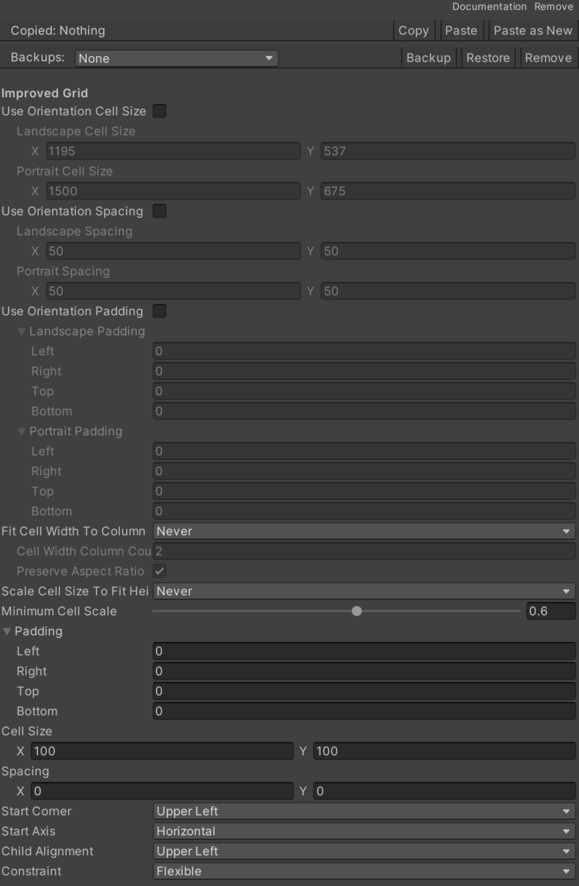
- Cell Width Column Count – Number of columns used when calculating cell width.
- Fit Cell Width To Column Count – Defines when cell width should be calculated from a target column count.
- Never – Height fitting never applies.
- Landscape – Height fitting applies only when width is greater than or equal to height.
- Portrait – Height fitting applies only when height is greater than width.
- Always – Height fitting applies in all orientations.
- Landscape Cell Size – Cell size used when the RectTransform is in landscape orientation.
- Landscape Padding – Padding used when the RectTransform is in landscape orientation.
- Landscape Spacing – Spacing used when the RectTransform is in landscape orientation.
- Minimum Cell Scale – Minimum proportional cell scale used only when there is not enough height for the configured spacing.
- Portrait Cell Size – Cell size used when the RectTransform is in portrait orientation.
- Portrait Padding – Padding used when the RectTransform is in portrait orientation.
- Portrait Spacing – Spacing used when the RectTransform is in portrait orientation.
- Preserve Aspect Ratio When Fitting Width – Keeps the original cell aspect ratio when cell width is calculated from a column count.
- Scale Cell Size To Fit Height – Defines when cell size should be scaled down to fit the RectTransform height.
- Never – Height fitting never applies.
- Landscape – Height fitting applies only when width is greater than or equal to height.
- Portrait – Height fitting applies only when height is greater than width.
- Always – Height fitting applies in all orientations.
- Use Orientation Cell Size – Uses the configured orientation cell sizes instead of the base GridLayoutGroup cell size.
- Use Orientation Padding – Uses the configured orientation padding instead of the base GridLayoutGroup padding.
- Use Orientation Spacing – Uses the configured orientation spacing instead of the base GridLayoutGroup spacing.
Use
Add this component to the GameObject that should own the behavior.
Configure the inspector fields listed in Reference and assign the required scene or asset references before entering Play Mode.