
Files: CGFCanvasImageRoundedBehavior.cs
Path: "CGF/Systems/UI/ImageComponent"
Description
Behavior that allows the associated gameobject to handles rendering an Image with rounded corners and an optional border in a Unity Canvas.
Reference
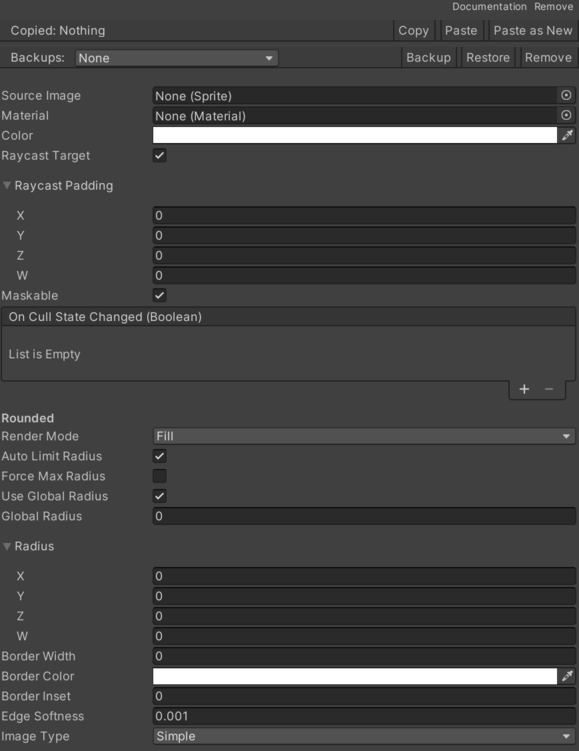
- Auto Limit Radius – Determines whether the corner radius is limited to half the minimum dimension of the RectTransform.
- Border Color – The color of the border.
- Border Inset – Offset to move the border inward (positive values move it inside the shape).
- Border Width – The width of the border around the image.
- Edge Softness – The smothness of the edge of the shape.
- Fill Amount – The fill amount of the image.
- Fill Clockwise – Determines whether the fill should be clockwise or counter-clockwise.
- Fill Method – How the Image is filled.
- Force Max Radius – Forces the global corner radius to always be half the smallest RectTransform dimension regardless of user settings.
- Global Radius – The global corner radius applied to all corners of the image when _useGlobalRadius is true.
- Main Texture – Apply the source image to the material.
- Origin 180 – The origin point for the 180-degree radial fill.
- Bottom – Center of the radial at the center of the Bottom edge.
- Left – Center of the radial at the center of the Left edge.
- Top – Center of the radial at the center of the Top edge.
- Right – Center of the radial at the center of the Right edge.
- Origin 360 – The origin point for the 360-degree radial fill.
- Bottom – Arc starting at the center of the Bottom edge.
- Right – Arc starting at the center of the Right edge.
- Top – Arc starting at the center of the Top edge.
- Left – Arc starting at the center of the Left edge.
- Origin 90 – The origin point for the 90-degree radial fill.
- Bottom Left – Radial starting at the Bottom Left corner.
- Top Left – Radial starting at the Top Left corner.
- Top Right – Radial starting at the Top Right corner.
- Bottom Right – Radial starting at the Bottom Right corner.
- Origin Horizontal – The origin point for the horizontal fill.
- Left – >Origin at the Left side.
- Right – >Origin at the Right side.
- Origin Vertical – The origin point for the vertical fill.
- Bottom – >Origin at the Bottom Edge.
- Top – >Origin at the Top Edge.
- Radius – Specifies individual corner radii for each of the four corners of the image.
- Render Mode – The render mode for the image (border only, fill and border, or fill only).
- Fill – Renders only the fill without border.
- Border – Renders only the border without fill.
- Both – Renders both fill and border.
- Sprite – Source image.
- Type – How the Image is drawn.
- Simple – Displays the full Image.
- Filled – Displays only a portion of the Image.
- Filled Shader – Displays a portion of the Image using a shader-driven effect (data passed via UVs).
- Use Global Radius – Indicates whether the same global corner radius should be applied to all corners of the image.
Use
Add this component to the GameObject that should own the behavior.
Configure the inspector fields listed in Reference and assign the required scene or asset references before entering Play Mode.