
Files: CGFTTSManager.cs
Path: "CGF/Systems/TTS"
Description
Singleton entry point for text to speech playback in CGF.
Reference
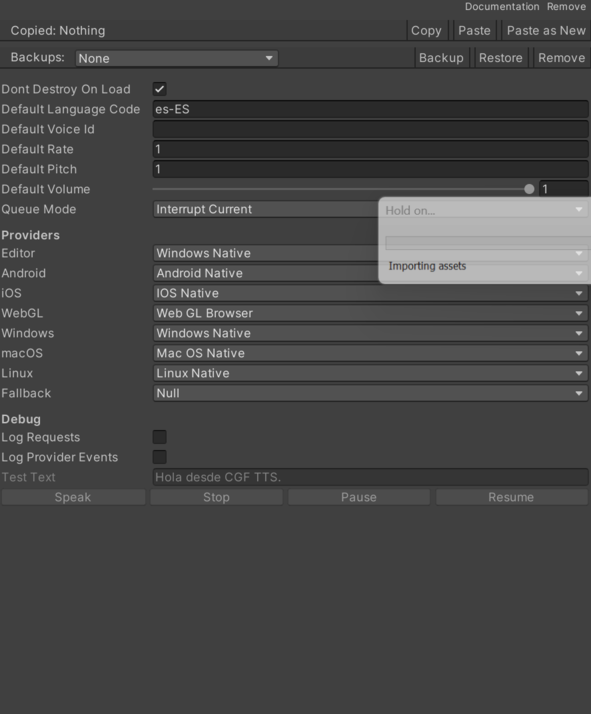
- Android Provider – Provider selected for Android player builds.
- Null – Fallback provider that does not play audio.
- Android Native – Android native TextToSpeech provider.
- iOS Native – iOS native AVSpeechSynthesizer provider.
- WebGL Browser – WebGL browser speechSynthesis provider.
- Windows Native – Windows native system speech provider.
- macOS Native – macOS native say command provider.
- Linux Native – Linux native speech-dispatcher or espeak provider.
- Default Language Code – Language code applied to requests that do not specify one.
- Default Pitch – Speech pitch applied to requests that do not specify one.
- Default Queue Mode – Queue mode applied to requests that use the default queue policy.
- Default – Use the manager default queue mode.
- Interrupt Current – Stop the current speech and play the new request immediately.
- Queue – Add the new request after the current queue.
- Ignore If Speaking – Ignore the new request when speech or queued work exists.
- Replace Queue – Clear queued requests, stop the current speech and play the new request.
- Default Rate – Speech rate applied to requests that do not specify one.
- Default Voice ID – Provider-specific voice ID applied to requests that do not specify one.
- Default Volume – Speech volume applied to requests that do not specify one.
- Dont Destroy On Load – Keeps the manager GameObject alive when Unity loads a new scene.
- Editor Provider – Provider selected when running inside the Unity Editor.
- Null – Fallback provider that does not play audio.
- Android Native – Android native TextToSpeech provider.
- iOS Native – iOS native AVSpeechSynthesizer provider.
- WebGL Browser – WebGL browser speechSynthesis provider.
- Windows Native – Windows native system speech provider.
- macOS Native – macOS native say command provider.
- Linux Native – Linux native speech-dispatcher or espeak provider.
- Fallback Provider – Provider used when the selected provider cannot be created.
- Null – Fallback provider that does not play audio.
- Android Native – Android native TextToSpeech provider.
- iOS Native – iOS native AVSpeechSynthesizer provider.
- WebGL Browser – WebGL browser speechSynthesis provider.
- Windows Native – Windows native system speech provider.
- macOS Native – macOS native say command provider.
- Linux Native – Linux native speech-dispatcher or espeak provider.
- Linux Provider – Provider selected for Linux standalone builds.
- Null – Fallback provider that does not play audio.
- Android Native – Android native TextToSpeech provider.
- iOS Native – iOS native AVSpeechSynthesizer provider.
- WebGL Browser – WebGL browser speechSynthesis provider.
- Windows Native – Windows native system speech provider.
- macOS Native – macOS native say command provider.
- Linux Native – Linux native speech-dispatcher or espeak provider.
- Log Provider Events – Enables provider event debug logs.
- Log Requests – Enables request-level debug logs.
- WebGL Provider – Provider selected for WebGL player builds.
- Null – Fallback provider that does not play audio.
- Android Native – Android native TextToSpeech provider.
- iOS Native – iOS native AVSpeechSynthesizer provider.
- WebGL Browser – WebGL browser speechSynthesis provider.
- Windows Native – Windows native system speech provider.
- macOS Native – macOS native say command provider.
- Linux Native – Linux native speech-dispatcher or espeak provider.
- Windows Provider – Provider selected for Windows standalone builds.
- Null – Fallback provider that does not play audio.
- Android Native – Android native TextToSpeech provider.
- iOS Native – iOS native AVSpeechSynthesizer provider.
- WebGL Browser – WebGL browser speechSynthesis provider.
- Windows Native – Windows native system speech provider.
- macOS Native – macOS native say command provider.
- Linux Native – Linux native speech-dispatcher or espeak provider.
- iOS Provider – Provider selected for iOS player builds.
- Null – Fallback provider that does not play audio.
- Android Native – Android native TextToSpeech provider.
- iOS Native – iOS native AVSpeechSynthesizer provider.
- WebGL Browser – WebGL browser speechSynthesis provider.
- Windows Native – Windows native system speech provider.
- macOS Native – macOS native say command provider.
- Linux Native – Linux native speech-dispatcher or espeak provider.
- macOS Provider – Provider selected for macOS standalone builds.
- Null – Fallback provider that does not play audio.
- Android Native – Android native TextToSpeech provider.
- iOS Native – iOS native AVSpeechSynthesizer provider.
- WebGL Browser – WebGL browser speechSynthesis provider.
- Windows Native – Windows native system speech provider.
- macOS Native – macOS native say command provider.
- Linux Native – Linux native speech-dispatcher or espeak provider.
Use
Add this component to the GameObject that should own the behavior.
Configure the inspector fields listed in Reference and assign the required scene or asset references before entering Play Mode.