
Files: CGFTrailScriptable.cs
Path: "CGF/Systems/VisualEffects/Trail"
Description
Trail.
Reference
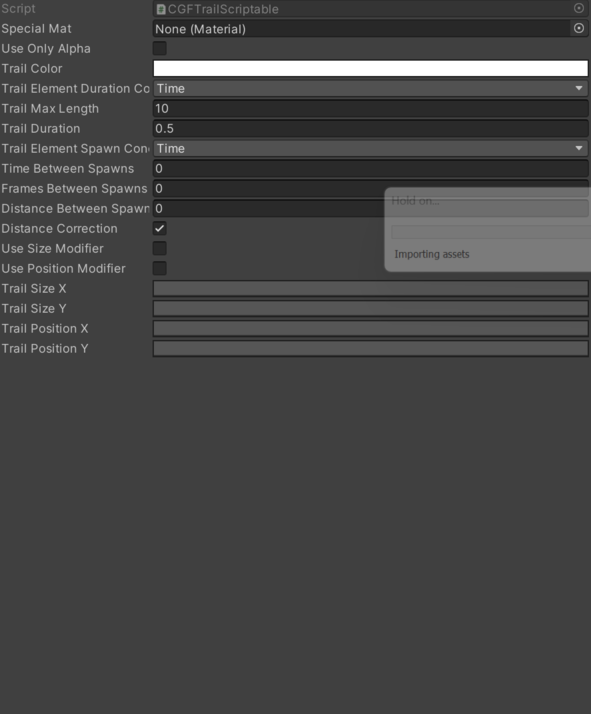
- Distance Between Spawns – Distance between each trail element spawn.
- Distance Correction – Check this to calculate the error between each iteration and fill the gap.
- Frames Between Spawns – Frames between each trail element spawn.
- Special Mat – Set this if you want to use a special material for your sprites. Leave blank otherwise.
- Time Between Spawns – Time between each trail element spawn.
- Trail Color – Trail color over time.
- Trail Duration – Max duration of each trail element (in seconds) (-1 = infinite (not recommanded)).
- Trail Element Duration Condition – Trail element dissapear condition (max time or max element count).
- Time – Selects the time option.
- Element Count – Selects the element count option.
- Trail Element Spawn Condition – Condition needed for the trail element to spawn :
- Time : interval in second between each spawn
- FrameCount : interval in frames
- Distance : If the object is too far from th previous, spawn an element.
- Time – Selects the time option.
- Frame Count – Selects the frame count option.
- Distance – Selects the distance option.
- Trail Max Length – Length of the trail in elements.
- Trail Position X – Trail position X over time.
- Trail Position Y – Trail position Y over time.
- Trail Size X – Trail size X over time.
- Trail Size Y – Trail size Y over time.
- Use Only Alpha – Tick this if you just want to modify the alpha channel over time, and not the RGB (set in the "Trail Color" gradient).
- Use Position Modifier – Modify element position over time.
- Use Size Modifier – Modify element size over time.
Use
Create or assign the ScriptableObject asset in the system that consumes this shared configuration.
Configure the asset fields listed in Reference before using it at runtime.