
Files: CGFPixelPerfectCameraBehavior.cs
Path: "CGF/Systems/Cam"
Description
Extended 2D Pixel Perfect camera behavior with CGF zoom helpers.
Reference
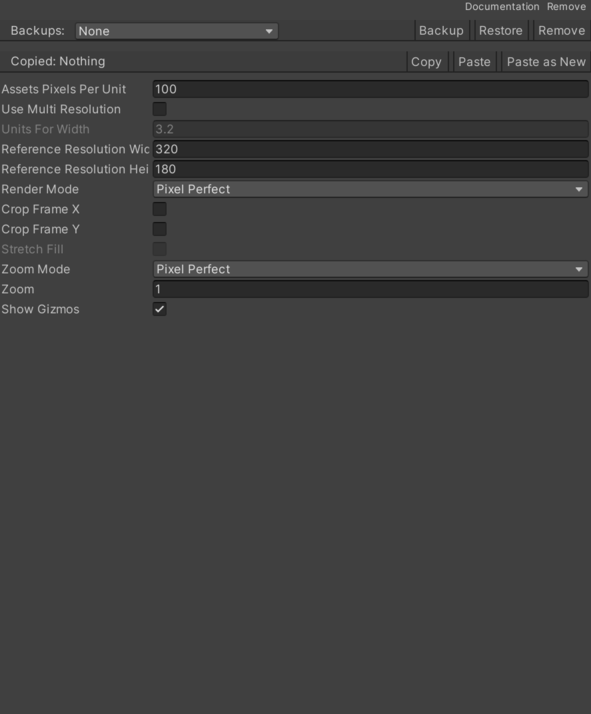
- Reference Resolution X – Base horizontal reference resolution used before the CGF zoom is applied.
- Reference Resolution Y – Base vertical reference resolution used before the CGF zoom is applied.
- Render Mode – Rendering mode used to configure the mutually exclusive Pixel Perfect Camera snapping/upscale options.
- Pixel Perfect – Uses the base Pixel Perfect Camera without sprite pixel snapping or an upscale render texture.
- Pixel Snapping – Enables SpriteRenderer pixel snapping.
- Upscale Render Texture – Renders to a low-resolution render texture and upscales it.
- Show Gizmos – Draws the Pixel Perfect Camera scene view rectangles.
- Units For Width – Visible width in Unity units used when Use Multi Resolution is enabled.
For example, if the player is 1 unit wide and Units For Width is 10, the camera shows 10 world units from left to right.
- Use Multi Resolution – Uses a fixed visible width in world units to adapt the reference resolution to the current aspect ratio.
- Zoom – Additional zoom applied by reducing the effective reference resolution used by the base Pixel Perfect Camera.
- Zoom Mode – Zoom mode used to choose between strict pixel perfect zoom and smooth decimal zoom.
- Pixel Perfect – Applies zoom through the Pixel Perfect Camera reference resolution.
- Smooth – Applies zoom to the camera orthographic size, allowing decimal transitions.
Use
Add this component to the GameObject that should own the behavior.
Configure the inspector fields listed in Reference and assign the required scene or asset references before entering Play Mode.