
Files: CGFCanvasParticleSystemBehavior.cs
Path: "CGF/Systems/UI/Effects"
Description
Canvas particle system based on the native ParticleSystem.
Reference
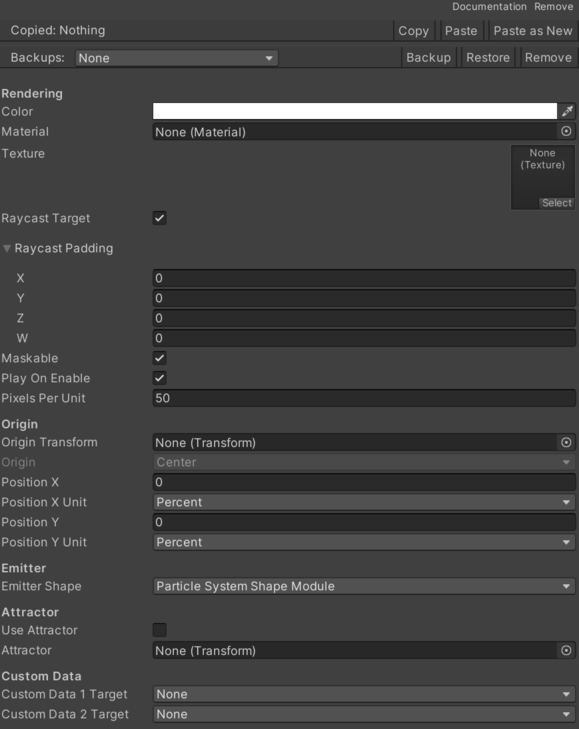
- Attractor – Transform that particles are attracted to when the attractor is active.
- Custom Data 1Target – UI vertex channel where ParticleSystem Custom Data 1 is mapped.
- None – No option is selected.
- UV 1 – Selects the uv1 option.
- UV 2 – Selects the uv2 option.
- UV 3 – Selects the uv3 option.
- Normal – Selects the normal option.
- Tangent – Selects the tangent option.
- Custom Data 2Target – UI vertex channel where ParticleSystem Custom Data 2 is mapped.
- None – No option is selected.
- UV 1 – Selects the uv1 option.
- UV 2 – Selects the uv2 option.
- UV 3 – Selects the uv3 option.
- Normal – Selects the normal option.
- Tangent – Selects the tangent option.
- Emitter Shape – Defines whether emission uses the ParticleSystem Shape Module or the UI element RectTransform.
- Particle System Shape Module – Selects the particle system shape module option.
- Rect Transform – Selects the rect transform option.
- Origin – Base origin used to convert ParticleSystem positions to UI space.
- Center – Selects the center option.
- Top – Pending documentation.
- Bottom – Pending documentation.
- Left – Pending documentation.
- Right – Pending documentation.
- Top Left – Pending documentation.
- Top Right – Pending documentation.
- Bottom Left – Pending documentation.
- Bottom Right – Pending documentation.
- Origin Transform – Optional Transform used as the particle origin. If it exists, it replaces the enum origin.
- Pixels Per Unit – Conversion factor between ParticleSystem units and Canvas reference pixels.
- Play On Enable – Indicates whether the particle system should play when activated.
- Position X – Horizontal displacement applied to the origin.
- Position X Unit – Unit used to interpret horizontal displacement.
- Pixels – Selects the pixels option.
- Percent – Selects the percent option.
- Position Y – Vertical displacement applied to the origin.
- Position Y Unit – Unit used to interpret vertical displacement.
- Pixels – Selects the pixels option.
- Percent – Selects the percent option.
- Texture – Texture used to render each particle on the Canvas.
- Use Attractor – Indicates whether a ForceField toward the target transform should be created and maintained.
Use
Add this component to the GameObject that should own the behavior.
Configure the inspector fields listed in Reference and assign the required scene or asset references before entering Play Mode.