
Files: CGFColorPickerTool.cs
Path: "CGF/Editor/Tools"
Menu: "CGF/2D /Color Picker"
Description
Color picker tool.
Reference
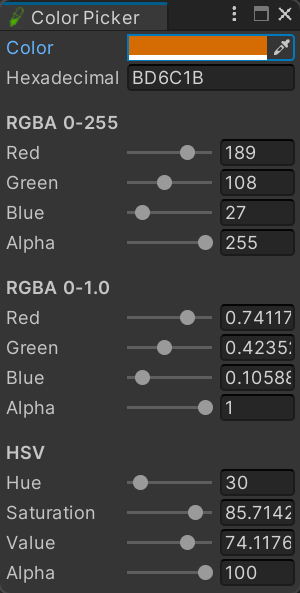
- Color – Pick the color whose hexadecimal, RGBA and HSV representations are shown below.
- Hexadecimal – Hexadecimal RGBA representation of the current color. Enter a valid code to update every channel.
- RGBA 0-255
- Red – Red channel as a byte value from 0 to 255.
- Green – Green channel as a byte value from 0 to 255.
- Blue – Blue channel as a byte value from 0 to 255.
- Alpha – Opacity channel as a byte value from 0 for transparent to 255 for opaque.
- RGBA 0-1.0
- Red – Normalized red channel from 0 to 1.
- Green – Normalized green channel from 0 to 1.
- Blue – Normalized blue channel from 0 to 1.
- Alpha – Normalized opacity from 0 for transparent to 1 for opaque.
- HSV
- Hue – Position around the color wheel in degrees from 0 to 360.
- Saturation – Color intensity as a percentage from gray to fully saturated.
- Value – Color brightness as a percentage from black to full brightness.
- Alpha – Opacity as a percentage from transparent to opaque.
Use
Open the tool from CGF/2D /Color Picker in the Unity editor.
Use the controls listed in Reference to configure the window workflow.