
Files: CGFObjectReplacerTool.cs
Path: "CGF/Editor/Tools"
Menu: "CGF/Objects/Object Replacer"
Description
Tool that allows replace a gameobject on the scene with other gameobject or a prefab.
Reference
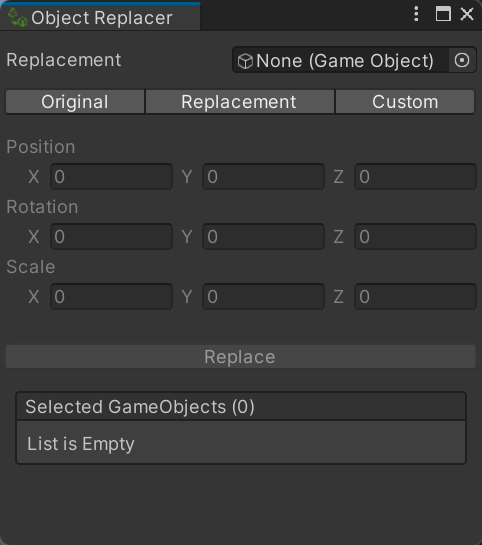
- Replacement – Prefab or GameObject instantiated in place of every selected object.
- Original – Use each original object's position, rotation and scale for its replacement.
- Replacement – Use the replacement object's authored position, rotation and scale.
- Custom – Use the position, rotation and scale entered below.
- Position – World position assigned to every replacement when Custom transform mode is selected.
- Rotation – World rotation in Euler angles assigned to every replacement when Custom transform mode is selected.
- Scale – Local scale assigned to every replacement when Custom transform mode is selected.
- Replace – Replace only this selected GameObject with an instance of the replacement prefab, preserving children and the chosen transform values.
- Replace – Replace every selected GameObject with an instance of the replacement prefab, preserving children and the chosen transform values.
Use
Open the tool from CGF/Objects/Object Replacer in the Unity editor.
Use the controls listed in Reference to configure the window workflow.