
Files: CGFTweenAnimationConversorTool.cs
Path: "CGF/Editor/Tools/TweenAnimation"
Menu: "CGF/Animation/Tween Animation Conversor"
Description
Editor tool that converts Unity and CGF tween animation assets in both directions.
Reference
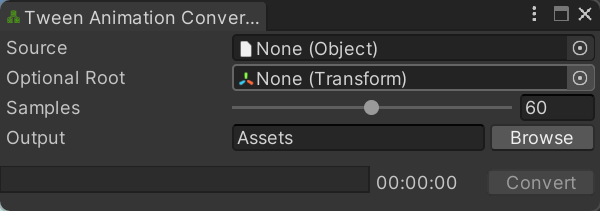
- Source – AnimationClip or compatible animation source to convert.
- Optional Root – Supplies values for channels omitted by a Unity AnimationClip.
- Samples – Number of samples generated for each second of animation.
- Output – Project-relative Assets folder where converted Tween Animation Clip assets are created.
- Browse – Choose the project folder where converted Tween Animation Clip assets will be created.
- Convert – Convert the selected Unity animation source into CGF Tween Animation Clip assets in the output folder.
Use
Open the tool from CGF/Animation/Tween Animation Conversor in the Unity editor.
Use the controls listed in Reference to configure the window workflow.