Menu: “Window/Extensions/CG PsT – Channel Packer”
Description
Panel that allows set one color channels and exlude the rest of the selected layer or group.
Reference
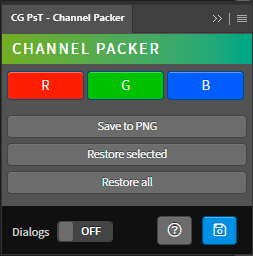
- R – Enable the red channel and eclude the green and blue channels of the selected layers and groups.
- G – Enable the green channel and eclude the red and blue channels of the selected layers and groups.
- B – Enable the green channel and eclude the red and green channels of the selected layers and groups.
- Save to PNG – Save a PNG image from the open document, save the file in the same path of the document if not in the desktop.
- Restore selected – Enable all color channels of the selected layers and groups.
- Restore all – Enable all color channels of all layers and groups.
- Dialogs – Show dialog messages with useful information during the execution of the panel.
- Help – Open the CG Ps Tools online manual.
- Save – Save the active document.
Use
Open a document, select one or multiple layers and groups and press the R, G or B buttons to set the right color channel and exclude the rest.