Menu: “Window/Extensions/CG PsT – PSD to PDF”
Description
Panel that allows the generation of a multipage PDF file using the layers of the document as pages. Uses ZIP compression.
Reference
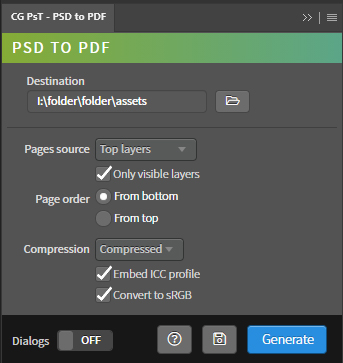
- Destination – Path of the destination folder of the exported PDF file. It is automatically updated with the path of the active document. It can be edited from the input field or using the folder selection window.
- Pages source – Method to obtain the pages.
- Top layers – Method to obtain pages from the layers and groups in the root of the document.
- Selected layers – Method to obtain pages from the selected layers.
- Only visible layers – Determines if the hidden layers of the document are used.
- Page order – Page ordering mode.
- From bottom – Sort the pages based on the ascending order of the layer list.
- From top – Sort the pages based on the descending order of the layer list.
- Compression – Compression mode.
- JPEG – JPEG compression at 12 quality.
- ZIP – ZIP compression.
- Compressed – Custom compression, uses a existing preset defined by the user and called “compressed”.
- Embed ICC profile – Save the color profile to the file.
- Convert to sRGB – Convert the color space of the fileto sRGB.
- Dialogs – Show dialog messages with useful information during the execution of the panel.
- Help – Open the CG Ps Tools online manual.
- Save – Save the active document.
- Generate – Run the main behavior of the panel.
Use
This tool require a specific Adobe PDF save presets with name “compressed”. Create a new preset from any Adobe Software and called “compressed” or copy a previous preset with the name “compressed” to the folder “C:\Users\[User name]\AppData\Roaming\Adobe\Adobe PDF\Settings”.
Open a document, then set the generation properties and press Generate.