
Files: CGFObjectReplacerTool.cs
Path: «CGF/Editor/Tools»
Menu: «Window/Chloroplast Games Framework/Object Replacer Tool»
Asset Store
Description
Tool that allows replace a gameobject on the scene with other gameobject or a prefab.
Reference
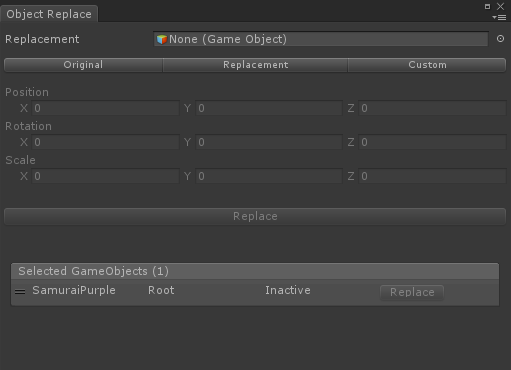
- Replacement – Replacement gameobject or prefab that replaces the selected gameobject.
- Transform Replacement – Original, keep the transform values from original gameobject or prefab. Replacement, use the transform values from replacement gameobject or prefab. Custom, use the values from Position, Rotation and Scale properties.
- Position – New position. Only for Custom mode.
- Rotation – New rotation. Only for Custom mode.
- Scale – New scale. Only for Custom mode.
- Selected GameObjects – Selected gameobject list
Use
Drag a gameobject or prefaf into the Replacement property, configure the transform mode and press the Replace button.
You can replace each selected gameobject one by one.